
Toyota RAV4 (XA40) 2013-2018 Owners Manual: Detailed bluetooth® system settings
You can confirm and change the detailed bluetooth® settings.
How to check and change detailed bluetooth® settings
- Display the “bluetooth* setup� screen.
- Select “system settings�.
- The following screen is displayed:
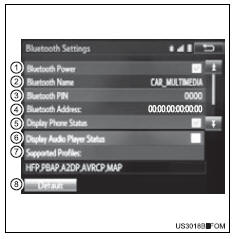
- Bluetooth® power on/off. You can change bluetooth® function on/off
- Bluetooth® name
- Change pin-code
- Bluetooth® address
- Display phone status
You can set the system to show the status confirmation display when connecting a telephone
- Display audio player status
You can set the system to show the status confirmation display when connecting an audio player
- Compatibility profile of the system
- Restore default settings
*: Bluetooth is a registered trademark of bluetooth sig, inc.
Editing the bluetooth* pin
You can change the pin-code that is used to register your bluetooth® devices in the system.
- Select “bluetooth* pin�.
- Input a pin-code, and select “ok�.
*: Bluetooth is a registered trademark of bluetooth sig, inc.
 Displaying a bluetooth®
device details
Displaying a bluetooth®
device details
You can confirm and change the registered device details.
Bluetooth® device registration status
Display the “bluetooth* setup� screen.
*: Bluetooth is a registered trademark of bluetooth ...
 Listening to bluetooth®
audio
Listening to bluetooth®
audio
The bluetooth® audio system enables the user to enjoy music
played on a portable player from the vehicle speakers via wireless
communication.
When a bluetooth® device cannot be connected, check t ...
Other materials:
Correct use of the seat
belts
Extend the shoulder belt so
that it comes fully over the
shoulder, but does not come
into contact with the neck or
slide off the shoulder.
Position the lap belt as low as
possible over the hips.
Adjust the position of the
seatback.
Sit up straight and well back
in the seat.
Do not twis ...
Display contents
Following information is displayed
on the multi-information
display.
Driving support system information
Displays recognized signs while the
RSA system (if equipped) is operating.
Displays an image when the following
systems are operating and a
menu icon other than is
selected:
LTA (Lane Traci ...
Checking and replacing
fuses
If any of the electrical components do not operate, a fuse may
have blown. If this happens, check and replace the fuses as necessary.
Vehicles without a smart key system:
turn the engine switch to the “lock� position.
Vehicles with a smart key system:
turn the engine switch off.
Aft ...
