
Toyota RAV4 (XA40) 2013-2018 Owners Manual: Folding the mirrors
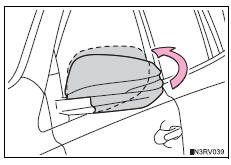
Push the mirror back in the direction of the vehicle’s rear.
Mirror angle can be adjusted when
- Vehicles without a smart key system
The engine switch is in the “acc� or “on� position.
- Vehicles with a smart key system
The engine switch is in accessory or ignition on mode.
When the mirrors are fogged up (vehicles with outside rear view mirror defoggers)
The outside rear view mirrors can be cleared using the mirror defoggers. Turn on the rear window defogger to turn on the outside rear view mirror defoggers.
Caution
Important points while driving
Observe the following precautions while driving.
Failure to do so may result in loss of control of the vehicle and cause an accident, resulting in death or serious injury.
- Do not adjust the mirrors while driving.
- Do not drive with the mirrors folded.
- Both the driver and passenger side mirrors must be extended and properly adjusted before driving.
When a mirror is moving
To avoid personal injury and mirror malfunction, be careful not to get your hand caught by the moving mirror.
When the mirror defoggers are operating (vehicles with outside rear view mirror defoggers)
Do not touch the rear view mirror surfaces, as they can become very hot and burn you.
 Adjustment procedure
To select a mirror to adjust,
press the switch.
Left
Right
To adjust the mirror, press the
switch.
Up
Right
Down
Left
...

Other materials:
Disassembly
Caution:
Wear protective gloves. Sharp areas on the seatback
frame, seat cushion frame and reclining adjuster may
injure your hands.
Remove rear seat headrest assembly
Remove rear seat center headrest
assembly
Remove center armrest hinge cover rh
Return the seatback to the upr ...
Exhaust pipe
Installation
Install front exhaust pipe assembly
Using a vernier caliper, measure the free length of
the compression spring.
Minimum length:
41.5 Mm (1.634 In.)
If the length is less than the minimum, replace the
compression spring.
Install a new gasket by hand so that its ...
Only back door lock / unlock functions do not operate
Description
The main body ecu receives lock / unlock switch signals and activates the
door lock motor accordingly.
Wiring diagram
Inspection procedure
Inspect back door with motor lock assembly
Apply the battery voltage to the door lock motor and
check the operation of the d ...
