
Toyota RAV4 (XA40) 2013-2018 Owners Manual: Gauges and meters
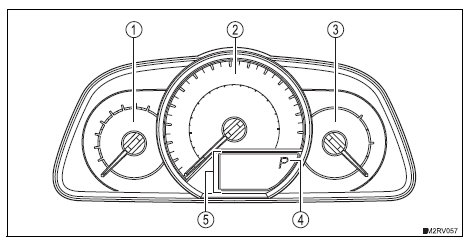
The units used on the speedometer may differ depending on the target region.
- Tachometer
Displays the engine speed in revolutions per minute
- Speedometer
Displays the vehicle speed
- Fuel gauge
Displays the quantity of fuel remaining in the tank
- Shift position and shift range
Displays the selected shift position or selected shift range
- Multi-information display
Presents the driver with a variety of driving-related data
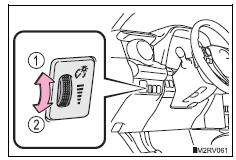
Instrument panel light control
The brightness of the instrument panel lights can be adjusted by turning the dial.
- Brighter
- Darker
Notice
To prevent damage to the engine and its components
Do not let the indicator needle of the tachometer enter the red zone, which indicates the maximum engine speed.
 Warning lights and indicators
The warning lights and indicators on the instrument cluster and
center panel inform the driver of the status of the vehicle’s various
systems.
For the purpose of explanation, the following illu ...
 Multi-information display
Display contents
The multi-information display presents the driver with a variety of driving-
related data including the current outside air temperature.
Outside temperature display
Indicates th ...
Other materials:
Rear axle hub and bearing
Components
On-vehicle inspection
Remove rear wheel
Disconnect rear drive shaft assembly lh
(for 4wd)
Disconnect the drive shaft (see page ds-69).
Remove rear disc brake cylinder assembly
lh (see page br-55)
Remove rear disc (see page br-57)
Check bearing backlash a ...
Displaying a bluetooth®
device details
You can confirm and change the registered device details.
Bluetooth® device registration status
Display the “bluetooth* setup� screen.
*: Bluetooth is a registered trademark of bluetooth sig, inc.
Select the device.
Select “device info�.
Following screen is displayed:
...
Vehicle load limits
Vehicle load limits include total load capacity, seating capacity,
twr (trailer weight rating) and cargo capacity.
Total load capacity (vehicle capacity weight)
Total load capacity means the combined weight of occupants, cargo
and luggage.
Seating capacity: 5 occupants (front 2, rear 3)
Seatin ...
