
Toyota RAV4 (XA40) 2013-2018 Owners Manual: Inside rear view mirror
The rear view mirror’s position can be adjusted to enable sufficient confirmation of the rear view.
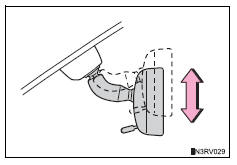
Adjusting the height of rear view mirror
The height of the rear view mirror can be adjusted to suit your driving posture.
Adjust the height of the rear view
mirror by moving it up and down.
Anti-glare function
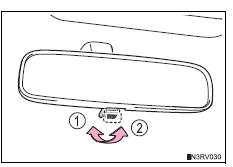
- Manual anti-glare inside rear view mirror
Reflected light from the headlights of vehicles behind can be reduced by operating the lever.
- Normal position
- Anti-glare position
- Auto anti-glare inside rear view mirror
Responding to the level of brightness of the headlights of vehicles behind, the reflected light is automatically reduced.
Changing automatic anti-glare function mode
On/off
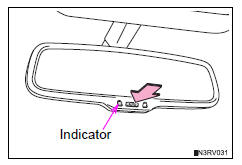
When the automatic anti-glare function is in on mode, the indicator illuminates.
Vehicles without a smart key system: the function will set to on mode each time the engine switch is turned to the “on� position.
Pressing the button turns the function to off mode. (The indicator also turns off.) Vehicles with a smart key system: the function will set to on mode each time the engine switch is turned to ignition on mode.
Pressing the button turns the function to off mode. (The indicator also turns off.)
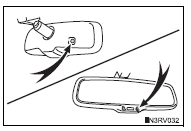
To prevent sensor error (vehicles with an auto anti-glare inside rear view mirror)
To ensure that the sensors operate properly, do not touch or cover them.
Caution
Do not adjust the position of the mirror while driving.
Doing so may lead to mishandling of the vehicle and cause an accident, resulting in death or serious injury.
 Steering wheel
Adjustment procedure
The steering wheel can be adjusted to a comfortable position.
Hold the steering wheel and
press the lever down.
Adjust to the ideal position by
moving the steering w ...

Other materials:
Stop light switch circuit
Description
When the stop light switch is turned on, current flows to the stop lights to
illuminate them.
Wiring diagram
Inspection procedure
Inspect fuse (stop)
Remove the stop fuse from the instrument panel
junction block.
Measure the resistance of the fuse.
Standard resi ...
Removal
Disconnect cable from negative battery
terminal
Caution:
Wait at least 90 seconds after disconnecting the
cable from the negative (-) battery terminal to
prevent airbag and seat belt pretensioner activation.
Remove fan and generator v belt
Remove the belt (see page em-6).
...
Skid control sensor (for 2wd)
Components
Removal
Hint:
Use the same procedures for the lh side and rh side.
The procedures listed below are for the lh side.
Disconnect cable from negative battery
terminal
Caution:
Wait at least 90 seconds after disconnecting the
cable from the negative (-) battery termin ...
