
Toyota RAV4 (XA40) 2013-2018 Service Manual: Parking brake system
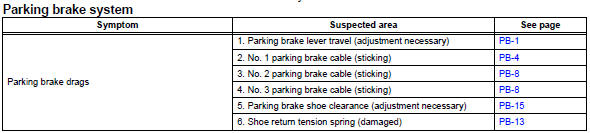
Problem symptoms table
Hint:
Use the table below to help determine the cause of the problem symptom. The potential causes of the symptoms are listed in order of probability in the "suspected area" column of the table. Check each symptom by checking the suspected areas in the order they are listed. Replace parts as necessary.
Adjustment
- Check parking brake lever travel
- Pull the lever upward with a force of approximately 200 n (20 kgf, 44 lbf) and count the number of clicks.
Ok: 7 to 9 clicks (without rear brake dragging)
- Remove upper rear console panel subassembly (see page ip-19)
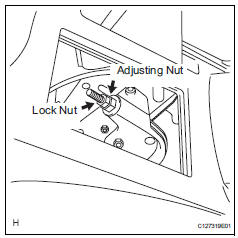
- Loosen lock nut and no. 1 Wire adjusting nut
- Remove rear wheel
- Adjust parking brake shoe clearance (see page pb-17)
- Install rear wheel torque: 103 n*m (1,050 kgf*cm, 76 ft.*Lbf)
- Adjust parking brake lever travel
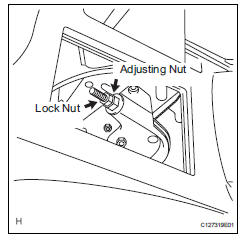
- Turn the no. 1 Wire adjusting nut until the lever travel is correct.
Ok: 7 to 9 clicks (without rear brake dragging) <lever pulling force: approximately 200 n (20 kgf, 44 lbf)>
- Tighten the lock nut.
Torque: 6.0 N*m (61 kgf*cm, 53 in.*Lbf)
- Operate the parking brake lever 3 to 4 times, and check the parking brake lever travel.
Ok: 7 to 9 clicks (without rear brake dragging) <lever pulling force: approximately 200 n (20 kgf, 44 lbf)>
- When operating the parking brake lever, check that the brake warning light illuminates at the first click.
Standard condition: brake warning light always illuminates at the first click.
 Parking brake
...
 Parking brake lever
Components
On-vehicle inspection
Check parking brake switch assembly
Remove the rear console box (see page ip-16).
Hint:
Refer to the procedures from the removal of the no.
...
Other materials:
Disassembly
Caution:
Wear protective gloves. Sharp areas on the seat frame
(with adjuster) may injure your hands.
Remove reclining power seat switch knob
Using a screwdriver, detach the knob.
Hint:
Tape the screwdriver tip before use.
Remove slide and vertical power seat switch knob
...
Road test
Problem symptom confirmation
Based on the result of the customer problem
analysis, try to reproduce the symptoms. If the
problem is that the transaxle does not shift up, shift
down, or the shift point is too high or too low,
conduct the following road test referring to the
automat ...
How to proceed with troubleshooting
Hint:
Use the procedure to troubleshoot the power door lock
control system.
*: Use the intelligent tester.
Vehicle brought to workshop
Inspect battery voltage
Standard voltage:
11 to 14 v
If the voltage is below 11 v, recharge or replace the battery
before proceeding.
...
