
Toyota RAV4 (XA40) 2013-2018 Service Manual: Check mode procedure
Hint:
Intelligent tester only: compared to normal mode, check mode is more sensitive to malfunctions. Therefore, check mode can detect the malfunctions that cannot be detected by normal mode.
Notice:
All the stored dtcs and freeze frame data are erased if:
- The ecm is changed from normal mode to check mode or vice versa;
- Or the ignition switch is turned from on to acc or off while in check mode. Before changing modes, always check and make a note of any dtcs and freeze frame data.
- Check mode procedure (using intelligent tester)
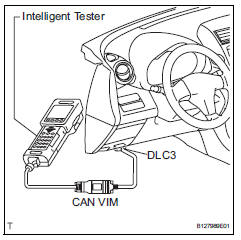
- Check and ensure the following conditions:
- Battery positive voltage 11 v or more.
- Throttle valve fully closed.
- Transmission in the p or n position.
- A/c switch off.
- Turn the ignition switch off.
- Connect the intelligent tester to the dlc3.
- Turn the ignition switch on.
- Turn the tester on.
- Select the following menu items: diagnosis / enhanced obd ii/ check mode.
- Switch the ecm from normal mode to check mode.
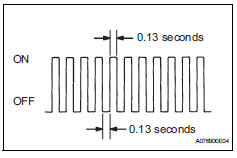
Make sure the mil flashes as shown in the illustration.- Start the engine.
- Make sure the mil turns off.
- Simulate the conditions of the malfunction described by the customer.
- Check dtcs and freeze frame data using the tester.
 Freeze frame data
Description
Freeze frame data records the engine conditions (fuel
system, calculated load, engine coolant temperature,
fuel trim, engine speed, vehicle speed, etc.) When a
malfunction is dete ...
 Fail-safe chart
If any of the following dtcs are set, the ecm enters fail-safe
mode to allow the vehicle to be driven temporarily.
Hint:
*: The vehicle can be driven slowly when the accelerator
pedal is depre ...
Other materials:
Short in front passenger side squib 2nd step circuit
Description
The front passenger side squib 2nd step circuit consists of the center airbag
sensor and the front
passenger airbag.
The circuit instructs the srs to deploy when the deployment conditions are met.
These dtcs are recorded when a malfunction is detected in the front passenger ...
Lost communication with front satellite sensor bus rh
Description
The front airbag sensor rh consists of the diagnostic circuit and the frontal
deceleration sensor.
If the center airbag sensor receives signals from the frontal deceleration
sensor, it determines whether or
not the srs should be activated.
Dtc b1602/83, b1603/83, b1612/83 ...
Lower instrument panel
Precaution
Precaution for vehicle with srs airbag and
seat belt pretensioner
Some operations in this section may affect the srs
airbags and seat belt pretensioner. Prior to
performing the corresponding operations, read the
srs airbag notice (see page rs-1).
Components
...
