
Toyota RAV4 (XA40) 2013-2018 Service Manual: Data list / active test
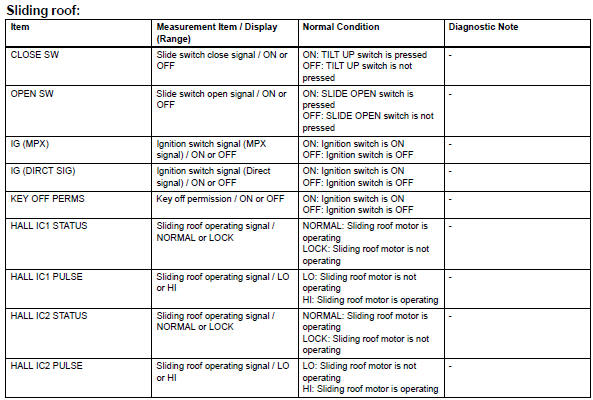
- Read data list
Hint:
Using the intelligent tester's data list allows switch, sensor, actuator and other item values to be read without removing any parts. Reading the data list early in troubleshooting is one way to save time.
- Connect the intelligent tester to the dlc3.
- Turn the ignition switch on.
- Read the data list according to the display on the tester.
- Perform active test
Hint:
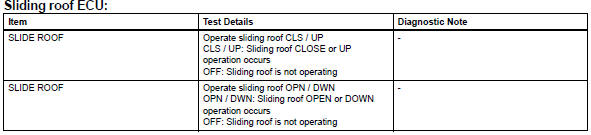
Performing the intelligent tester's active test allows relay, vsv, actuator and other items to be operated without removing any parts. Performing the active test early in troubleshooting is one way to save time. The data list can be displayed during the active test.
- Connect the intelligent tester to the dlc3.
- Turn the ignition switch on.
- Perform the active test according to the display on the tester.
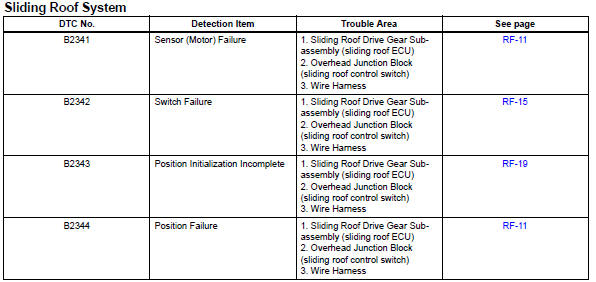
Diagnostic trouble code chart
 Dtc check / clear
Check dtc
Connect the intelligent tester to the dlc3.
Turn the ignition switch on and turn the tester on.
Select the following menu item: body / sliding roof /
dtc.
Check the dtc( ...
 On-vehicle inspection
Hint:
When pressing the switch for 0.3 Seconds or less, the roof
glass moves but auto operation does not operate.
Check auto operation
Turn the ignition switch on.
When the roof glass is ...
Other materials:
Manual shifting test
Manual shifting test
Hint:
Through this test, it can be determined whether the
trouble occurs in the electrical circuit or if it is a
mechanical problem in the transaxle.
If any abnormalities are found in the following test, the
problem is in the transaxle itself.
Disconnect ...
Disassembly
Remove park/neutral position switch assembly
Remove the nut, washer and control shaft lever.
Using a screwdriver, pry off the lock plate.
Remove the nut and lock plate.
Remove the 2 bolts and pull out the switch.
Remove breather plug hose
Remove oil coo ...
Crankshaft position sensor "A"
Description
The crankshaft position (ckp) sensor system consists of a ckp sensor plate
and a pickup coil.
The sensor plate has 34 teeth and is installed on the crankshaft. The pickup
coil is made of wound copper
wire, an iron core and magnet. The sensor plate rotates and, as each tooth ...
