
Toyota RAV4 (XA40) 2013-2018 Service Manual: Diagnostic trouble code chart
Hint:
If a trouble code is displayed during the dtc check, check the circuit listed for that code in the table below. Then proceed to the appropriate page.

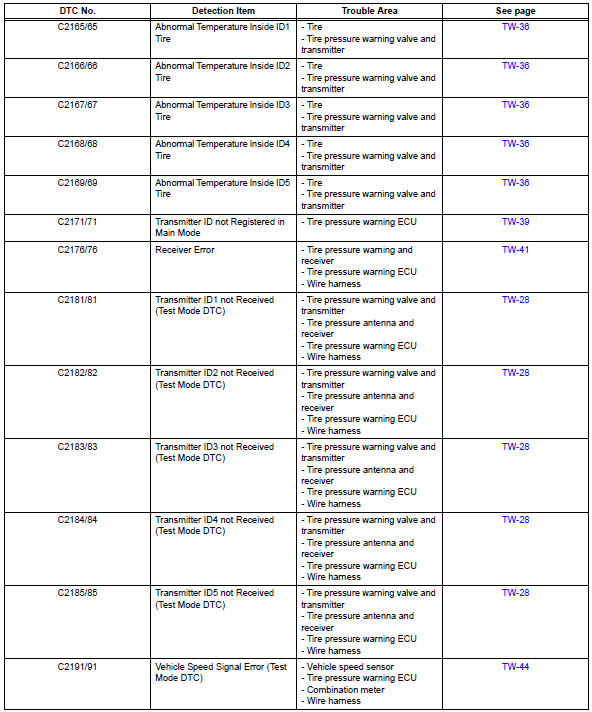
- Transmitter id
- No signal from transmitter id
- Transmitter id
- Abnormal temperature inside
- Transmitter id not registered in main mode
- Receiver error
- Vehicle speed signal error (test mode dtc)
- Tire pressure warning light circuit
- Ecu power source circuit
 Data list / active test
Read data list
Hint:
Using the intelligent tester's data list allows switch,
actuator and other item values to be read without
removing any parts. Reading the data list early in
troubleshoot ...
 Transmitter id
Description
The tire pressure warning valve and transmitter that is installed in the
tires and wheels measures the air
pressure of the tires. The measured values are transmitted to the tire pr ...
Other materials:
Push switch / key unlock warning switch malfunction
Description
This dtc is output if the transponder key ecu does not detect that the unlock
warning switch is on even
when the ignition switch is on. Under normal conditions, the unlock warning
switch is on when the
ignition switch is on.
Wiring diagram
Inspection procedure
Re ...
Purpose of readiness tests
The on-board diagnostic (obd ii) system is designed to
monitor the performance of emission related components,
and indicate any detected abnormalities with dtc
(diagnostic trouble codes). Since various components
need to be monitored during different driving conditions,
the obd ii syste ...
On-vehicle inspection
Check front seat side airbag assembly (vehicle not involved in
collision)
Perform a diagnostic system check (see page rs-
49).
With the front seat side airbag installed on the
vehicle, perform a visual check. If any of the defects
mentioned below are present, replace the fron ...
