
Toyota RAV4 (XA40) 2013-2018 Service Manual: Disassembly
- Remove radiator grille sub-assembly
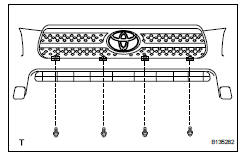
- Remove the 4 bolts and 4 nuts.
- Detach the 6 claws and remove the radiator grille.
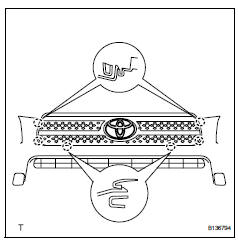
- Remove no. 1 Radiator grille lower
- Detach the 18 claws and remove the radiator grille.
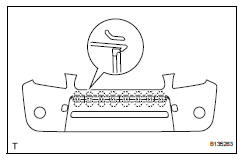
- Remove no. 2 Radiator grille lower
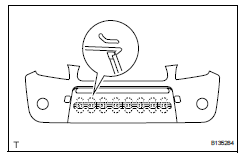
- Detach the 16 claws and remove the radiator grille.
- Remove front bumper arm hole cover lh
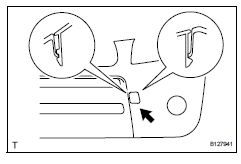
- Detach the 2 claws and disconnect the arm hole cover.
- Remove the hook and bumper arm hole cover.
- Remove front bumper arm hole cover rh
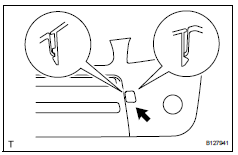
- Use the same procedures described for the lh side.
- Remove fog light assembly lh
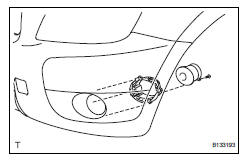
- Remove the screw and fog light.
- Remove the 3 bolts and fog light mounting bracket.
- Remove fog light assembly rh
Hint:
Use the same procedures described for the lh side.
- Remove front bumper hole cover lh (w/o fog light)
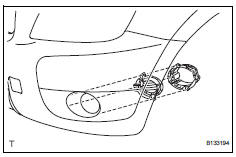
- Remove the 3 bolts, bumper hole cover and fog light mounting bracket.
- Remove front bumper hole cover rh (w/o fog light)
Hint:
Use the same procedures described for the lh side.
- Remove front bumper extension lh (for wide body)
- Detach the 7 outside moulding retainers and remove the extension lh.
Notice:
- If reusing the extension, take care not to damage the extension.
- Be careful not to damage the vehicle body.
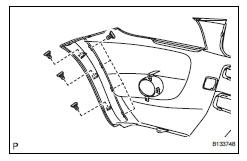
- Remove front bumper extension rh (for wide body)
Hint:
Use the same procedures described for the lh side.
 Removal
Disconnect cable from negative battery
terminal
Caution:
Wait at least 90 seconds after disconnecting the
cable from the negative (-) battery terminal to
prevent airbag and seat belt preten ...
 Reassembly
V
Attach the 7 outside moulding retainers to install the
extension.
Install front bumper extension rh (for wide
body)
Hint:
Use the same procedures described for the lh side ...
Other materials:
Rear coil spring
Components
Removal
Hint:
Use the same procedures for the rh side and lh side.
The procedures listed below are for the lh side.
Remove rear wheel
Remove skid control sensor wire (for 2wd)
(see page bc-198)
Remove rear speed sensor lh (for 4wd) (see
page bc-205)
Disconnect ...
Inner rear view mirror
Components
Removal
Remove inner rear view mirror assembly
Disengage the 2 claws and separate the inner rear
view mirror cover as shown in the illustration.
Remove the inner rear view mirror as shown in the
illustration.
Installation
Install inner rear view mir ...
Short to b+ in can bus line
Description
There may be a short circuit between the can bus line and +b when there is
resistance between
terminals 6 (canh) and 16 (bat) or terminals 14 (canl) and 16 (bat) of the dlc3.
Wiring diagram
Inspection procedure
Notice:
Turn the ignition switch off before measuring ...
