
Toyota RAV4 (XA40) 2013-2018 Service Manual: Engine immobiliser system
Parts location
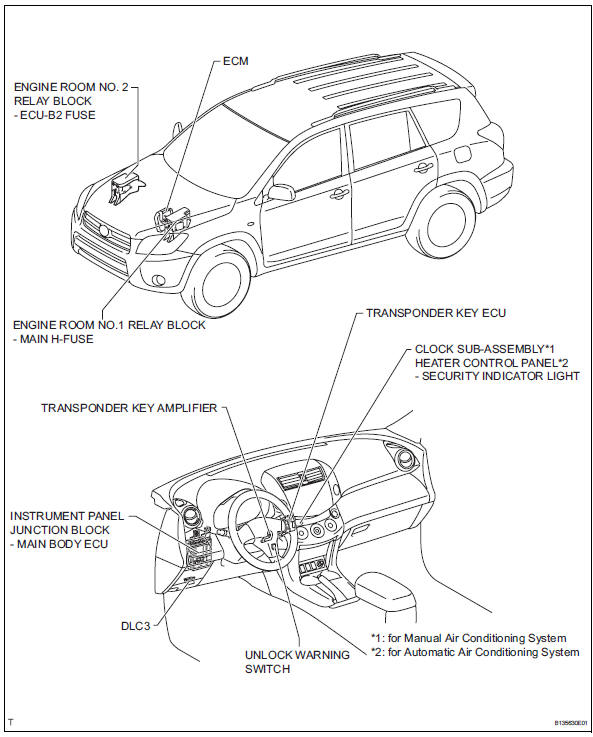
System diagram
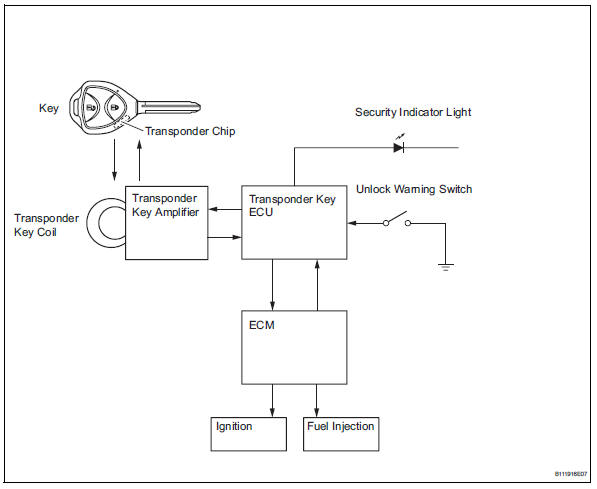
- System description
- How to proceed with troubleshooting
- Registration
- Problem symptoms table
- Terminals of ecu

 System description
Engine immobiliser system description
The engine immobiliser system is designed to prevent
the vehicle from being stolen. This system uses a
transponder key ecu that stores the key codes of
a ...
Other materials:
Emission inspection
and maintenance (i/m)
programs
Some states have vehicle emission inspection programs which
include obd (on board diagnostics) checks. The obd system
monitors the operation of the emission control system.
If the malfunction indicator lamp comes on
The obd system determines that a problem exists somewhere in the
emission contr ...
On-vehicle inspection
Inspect refrigerant pressure with
manifold gauge set
This method uses a manifold gauge set to locate
problem areas. Read the manifold gauge pressure
when these conditions are established. Test
conditions:
Temperature at the air inlet is 30 to 35°c (86 to
95°f).
Engine is ...
Exhaust pipe
Installation
Install front exhaust pipe assembly
Using a vernier caliper, measure the free length of
the compression spring.
Minimum length:
41.5 Mm (1.634 In.)
If the length is less than the minimum, replace the
compression spring.
Install a new gasket by hand so that its ...
