
Toyota RAV4 (XA40) 2013-2018 Service Manual: Identification information
Vehicle identification and serial numbers
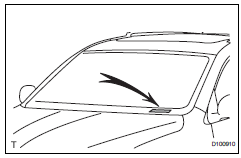
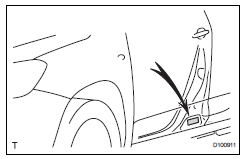
- Vehicle identification number
- The vehicle identification number is stamped on the vehicle identification number plate and on the certification label, as shown in the illustrations.
- Vehicle identification number plate
- Certification label
- Engine serial number and transaxle serial number
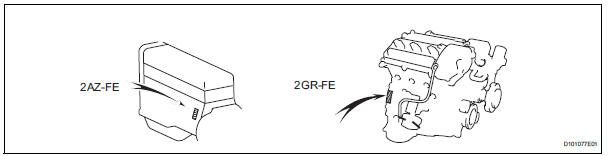
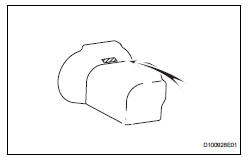
- The engine serial number is stamped on the cylinder block of the engine and the transaxle serial number is stamped on the housing as shown in the illustrations.
- Engine serial number
- Transaxle serial number
 How to use this manual
General information
General description
This manual is written in accordance with sae
j2008.
Diagnosis
Removing / installing, replacing, disassembling
/ reassembling, checking an ...

Other materials:
Multi-information display
Display contents
The multi-information display presents the driver with a variety of driving-
related data including the current outside air temperature.
Outside temperature display
Indicates the outside temperature.
The temperature range that can be
displayed is from -40„af (-40„ac) t ...
Installation
Caution:
Be sure to read the precautionary notices concerning the
srs airbag system before servicing it (see page rs-1).
Install roof side rail bracket lh
Install the bracket with the 2 bolts.
Torque: 14 n*m (143 kgf*cm, 10 ft.*Lbf)
Install curtain shield airbag assembly lh ...
Input speed sensor circuit no signal
Description
This sensor detects the rotation speed of the turbine, which shows the input
revolution of the transaxle. By
comparing the input speed signal (nt) with the counter gear speed sensor signal
(nc), the ecm detects
the shift timing of the gears and controls the engine torque and ...
