
Toyota RAV4 (XA40) 2013-2018 Service Manual: Internal control module random access memory (ram) error
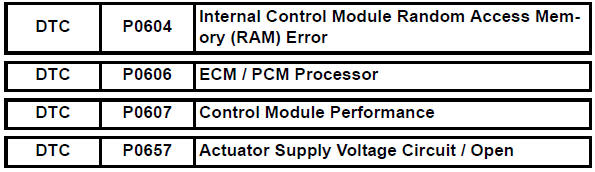
Description
The ecm continuously monitors its own internal memory status, internal circuits, and output signals transmitted to the throttle actuator. This self-check ensures that the ecm is functioning properly. If any malfunction is detected, the ecm sets the appropriate dtc and illuminates the mil.
The ecm memory status is diagnosed by internal mirroring of the main cpu and the sub cpu to detect random access memory (ram) errors. The two cpus also perform continuous mutual monitoring. The ecm illuminates the mil and sets a dtc if: 1) outputs from the two cpus are different or deviate from the standards, 2) the signals sent to the throttle actuator deviate from the standards, 3) a malfunction is found in the throttle actuator supply voltage, and 4) any other ecm malfunction is found.

Monitor strategy
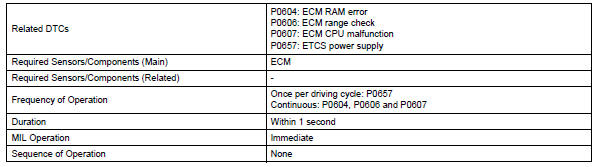
Typical enabling conditions

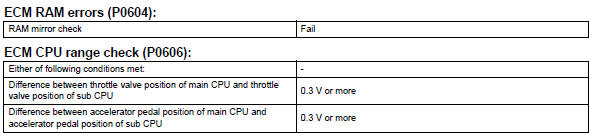
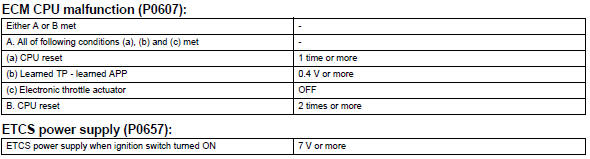
Typical malfunction thresholds
Inspection procedure
Read freeze frame data using the intelligent tester. Freeze frame data records the engine condition when malfunctions are detected. When troubleshooting, freeze frame data can help determine if the vehicle was moving or stationary, if the engine was warmed up or not, if the air-fuel ratio was lean or rich, and other data from the time the malfunction occurred.
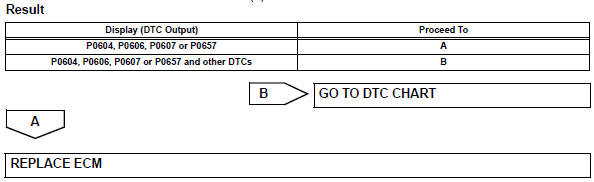
- Check any other dtcs output (in addition to dtc p0604, p0606, p0607 or p0657)
- Connect the intelligent tester to the dlc3.
- Turn the ignition switch on.
- Turn the tester on.
- Select the following menu items: diagnosis / enhanced obd ii / dtc info / current codes.
- Read dtcs.
 System voltage
Description
The battery supplies electricity to the ecm even when the ignition switch is
in the off position. This
power allows the ecm to store data such as dtc history, freeze frame data and ...
 Starter relay circuit high
Description
While the engine is being cranked, the positive battery voltage is applied to
terminal sta of the ecm. If
the ecm detects the starter control (sta) signal while the vehicle is bein ...
Other materials:
Lost communication with driver side - side airbag sensor assembly
Description
The side airbag sensor lh consists of part including the diagnostic circuit
and the lateral deceleration
sensor.
When the center airbag sensor receives signals from the lateral deceleration
sensor, it determines
whether or not the srs should be activated.
Dtc b1622/81 is ...
High mounted stop light assembly
Components
Removal
Disconnect cable from negative battery
terminal
Caution:
Wait at least 90 seconds after disconnecting the
cable from the negative (-) battery terminal to
prevent airbag and seat belt pretensioner activation.
Remove back door center garnish (see page
ed-59)
...
Problem symptoms table (2006/01- )
Hint:
Use the table below to help determine the cause of the
problem symptom. The potential causes of the symptoms are
listed in order of probability in the "suspected area" column
of the table. Check each symptom by checking the suspected
areas in the order they are listed. Replace p ...
