
Toyota RAV4 (XA40) 2013-2018 Service Manual: Key reminder warning system
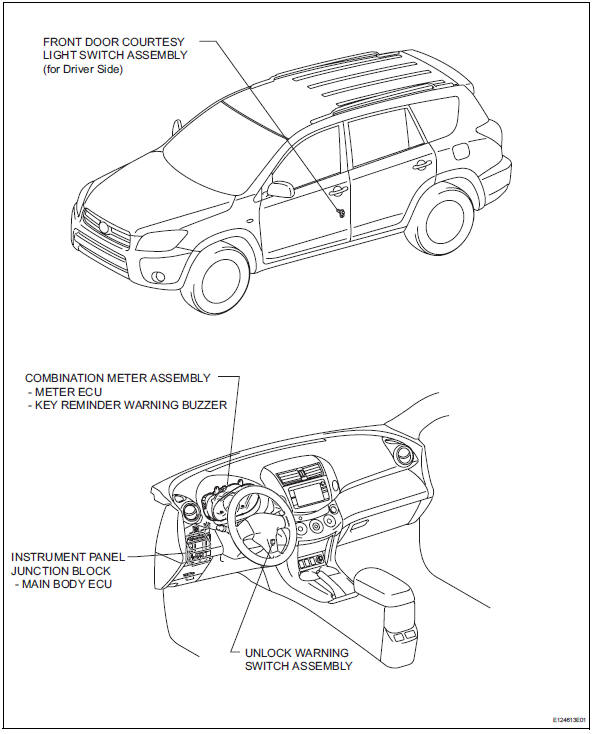
Parts location
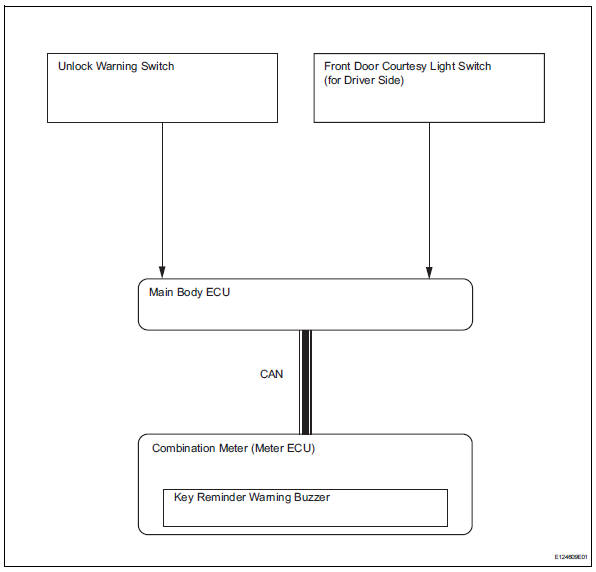
System diagram
- System description
- How to proceed with troubleshooting
- Operation check
- Problem symptoms table
- Terminals of ecu
- Diagnosis system
- Data list / active test
 Key lock-in prevention function does not work properly
Description
When the key is in the ignition key cylinder or the door courtesy light on
signal is output to the main body
ecu, performing the door lock operation with the lock switch does not lock ...
 System description
Key reminder warning system description
When the driver side door is opened with the key in
the ignition key cylinder and ignition switch in the
acc or off position, this system causes th ...
Other materials:
Installation
Hint:
Use the same procedures for the lh side and rh side.
The procedures listed below are for the lh side.
A bolt without a torque specification is shown in the
standard bolt chart (see page ss-2).
Install rear no. 1 Seat outer belt assembly lh
Align the claws with the sea ...
Brake front brake flexible hose
Components
Removal
Hint:
Use the same procedures for the lh side and rh side.
The procedures listed below are for the lh side.
Remove front wheel
Drain brake fluid
Notice:
Wash off brake fluid immediately if it comes in
contact with any painted surface.
Remove front flex ...
Refueling
Opening the fuel tank cap
Perform the following steps
to open the fuel tank cap:
Before refueling the vehicle
Close all the doors and windows,
and turn the engine
switch to OFF.
Confirm the type of fuel.
â– Fuel tank opening for unleaded
gasoline
To help prevent incorrect fueling,
your vehicle ...
