
Toyota RAV4 (XA40) 2013-2018 Service Manual: Lubrication system
On-vehicle inspection
- Check engine oil level
- Warm up the engine, stop the engine and wait for 5 minutes.
- Check that the engine oil level is between the l and
f marks of the oil dipstick.
If low, check for leakage and add oil up to the f mark.
Notice:
Do not add engine oil above the f mark.
- Check engine oil quality
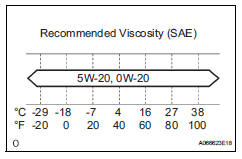
- Check the oil for deterioration, water intrusion, discoloration or thinning.
If the quality is visibly poor, replace the oil.
Oil grade:
Use api grade sl "energy-conserving" or ilsac multigrade engine oil. Sae 5w-20 and sae 0w-20 engine oil may be used. However, sae0w-20 is the best choice for good fuel economy and good starting in cold weather.
- Check oil pressure
- Disconnect the oil pressure switch connector.
- Using a 24 mm deep socket wrench, remove the oil pressure switch.
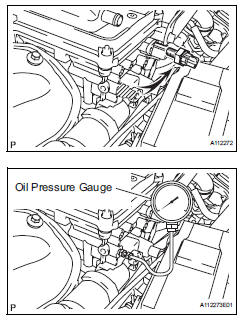
- Install the oil pressure gauge.
- Warm up the engine.
- Measure the oil pressure.
Standard oil pressure 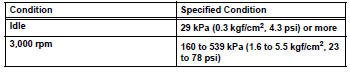
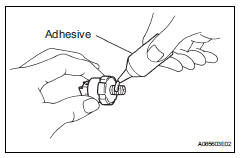
- Apply adhesive to 2 or 3 threads of the oil pressure switch.
Adhesive: toyota genuine adhesive 1344, three bond 1344 or equivalent
- Using a 24 mm deep socket wrench, install the oil pressure switch.
Torque: 15 n*m (153 kgf*cm, 11 ft.*Lbf)
Notice:
Do not start the engine within 1 hour of installation.
- Connect the oil pressure switch connector.
- Check for engine oil leakage.

 Oil filter
Components
Replacement
Caution:
Prolonged and repeated contact with engine oil will
cause the loss of natural oils from the skin, leading to
dryness, irritation and dermatitis. In additi ...
Other materials:
Lost communication with front passenger side - side airbag sensor assembly
Description
The side airbag sensor rh consists of parts including the diagnostic circuit
and the lateral deceleration
sensor.
When the center airbag sensor receives signals from the lateral deceleration
sensor, it determines
whether or not the srs should be activated.
Dtc b1627/82 i ...
Data list / active test
Read data list
Hint:
Using the intelligent tester's data list allows switch,
actuator and other item values to be read without
removing any parts. Reading the data list early in
troubleshooting is one way to save time.
Connect the intelligent tester (with can vim) to the
dlc3.
Turn ...
Problem symptoms table (2005/11-2006/01)
Hint:
Use the table below to help determine the cause of the
problem symptom. The potential causes of the symptoms
are listed in order of probability in the "suspected area"
column of the table. Check each symptom by checking the
suspected areas in the order they are listed. Re ...
