
Toyota RAV4 (XA40) 2013-2018 Service Manual: Precaution
- Check that the battery cables are connected to the correct terminals.
- Disconnect the battery cables if a quick charge is given to the battery.
- Do not perform tests with a high voltage insulation resistance tester.
- Never disconnect the battery while the engine is running.
- Check that the charging cable is tightly connected onto terminal b of the generator and the fuse box.
- Do not check whether the generator generates current or not while terminal f is connected to the other terminals.
Parts location
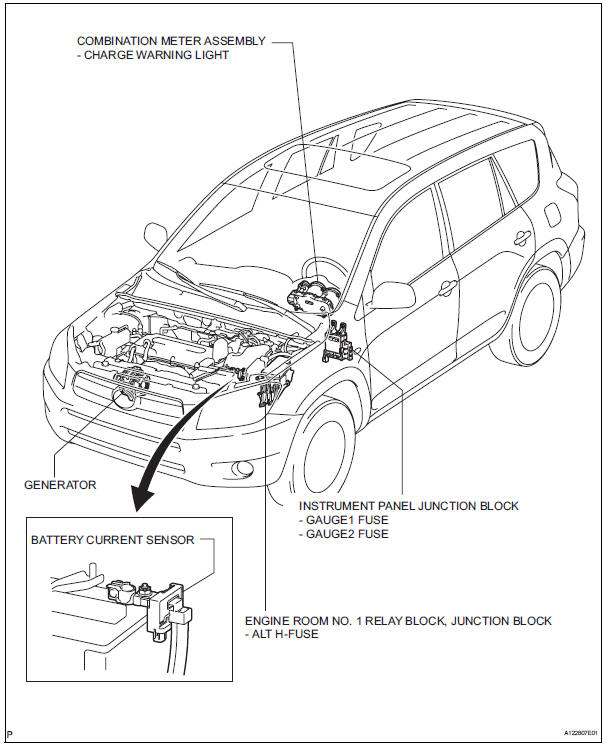
System diagram
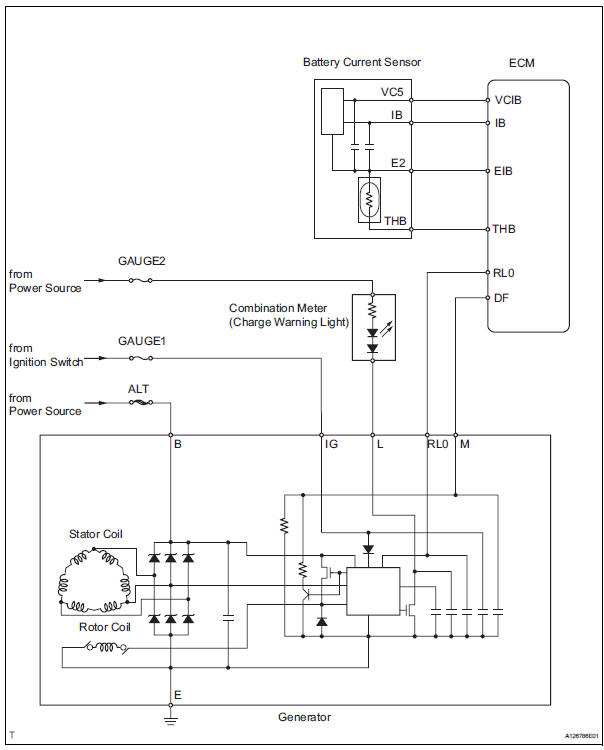
 Charging system
...
 On-vehicle inspection
Check battery condition
Notice:
If the battery is weak or if the engine is difficult to
start, perform the following procedures.
Check the battery for damage and deformation. If
severe d ...
Other materials:
Air outlet damper control servo motor circuit
Description
The damper servo sends pulse signals to indicate the damper position to the
air conditioning amplifier.
The air conditioning amplifier activates the motor (normal or reverse) based on
these signals to move the
mode damper to the appropriate position, which controls the air o ...
Ig power source circuit
Description
This is the main power source supplied to the air conditioning amplifier when
the ignition switch is on.
This power source is used for operating components, such as the air conditioning
amplifier and servo
motors.
Wiring diagram
Inspection procedure
Inspect fuse (ecu-i ...
Fuel consumption information
The fuel consumption information can be displayed on entune
premium audio with navigation and entune audio screen.
Display the trip information or past record screen
Vehicles with entune audio
Press the “car� button.
Vehicles with entune premium audio with navigation and entune
au ...
