
Toyota RAV4 (XA40) 2013-2018 Service Manual: Problem symptoms table (2006/01- )
Hint:
Use the table below to help determine the cause of the problem symptom. The potential causes of the symptoms are listed in order of probability in the "suspected area" column of the table. Check each symptom by checking the suspected areas in the order they are listed. Replace parts as necessary.
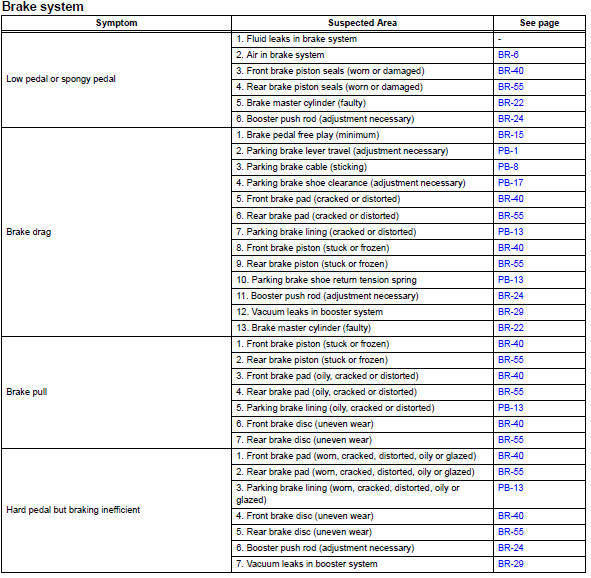
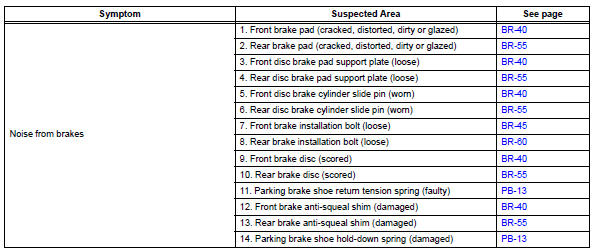
 Problem symptoms table (2005/11-2006/01)
Hint:
Use the table below to help determine the cause of the
problem symptom. The potential causes of the symptoms are
listed in order of probability in the "suspected area" column of
th ...
 Brake fluid
...
Other materials:
Disassembly
Remove idler pulley (see page em-23)
Remove oil dipstick
Remove oil dipstick guide (see page em-57)
Remove manifold stay (see page em-57)
Remove no. 2 Manifold stay (see page em-58)
Remove no. 1 Exhaust manifold heat
insulator (see page em-58)
Remove exhaust manifold converter subas ...
On-vehicle inspection
Check ignition coil assembly and perform spark test
Notice:
in this section, the terms "cold" and "hot" refer to
the temperature of the coils. "Cold" means
approximately -10 to 50°c (14 to 122°f). "Hot" means
approximately 50 to 100°c (122 to 212 ...
Center airbag sensor communication stop mode
Description
Wiring diagram
Inspection procedure
Notice:
Turn the ignition switch off before measuring the resistances of the
main wire and the branch
wire.
After the ignition switch is turned off, check that the key reminder
warning system and light
reminder warning system ...
