
Toyota RAV4 (XA40) 2013-2018 Service Manual: Rear combination light assembly
Components
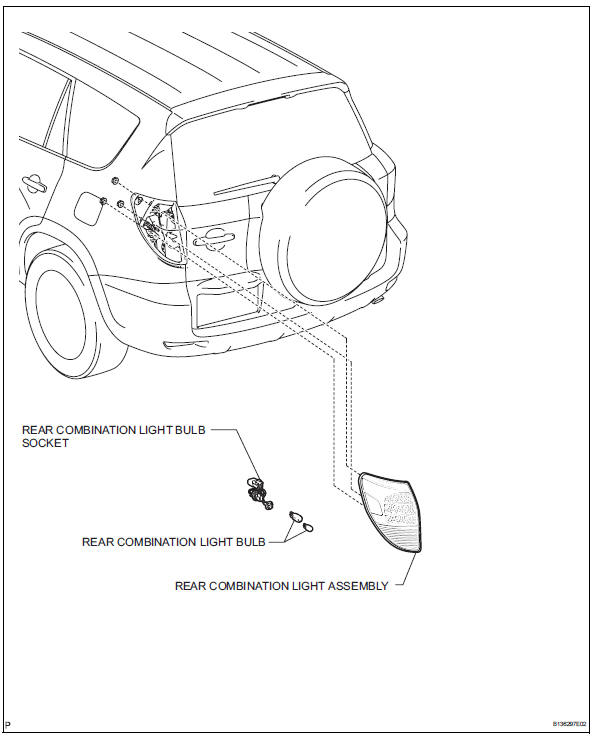
Removal
Hint:
- Use the same procedures for the rh and lh sides.
- The procedures listed below are for the lh side.
- Disconnect cable from negative battery terminal
Caution:
Wait at least 90 seconds after disconnecting the cable from the negative (-) battery terminal to prevent airbag and seat belt pretensioner activation.
- Remove rear combination light assembly
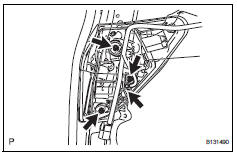
- Remove the 3 nuts and disconnect the connector.
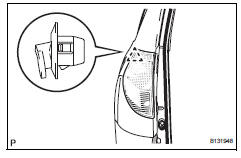
- Detach the clip and remove the light.
Disassembly
Hint:
- Use the same procedures for the rh and lh sides.
- The procedures listed below are for the lh side.
- Remove rear combination light bulb
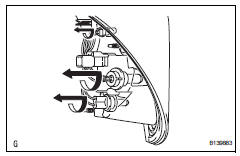
- Turn the 3 bulbs in the direction indicated by the arrows and pull to remove them.
Reassembly
Hint:
- Use the same procedures for the rh and lh sides.
- The procedures listed below are for the lh side.
- Install rear combination light bulb
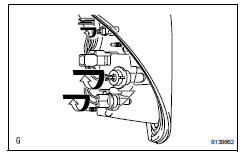
- Turn the 3 bulbs in the direction indicated by the arrows to install them.
 Fog light assembly
Components
Removal
Hint:
Use the same procedures for the rh and lh sides.
The procedures listed below are for the lh side.
Disconnect cable from negative battery terminal
Caution: ...
 License plate light assembly
Components
Removal
Disconnect cable from negative battery
terminal
Caution:
Wait at least 90 seconds after disconnecting the
cable from the negative (-) battery terminal to
prevent ai ...
Other materials:
Removal
Hint:
Use the same procedures for the rh side and lh side.
The procedures listed below are for the lh side.
When removing the moulding, heat the vehicle body and
moulding using a heat light.
Standard heating temperature
Notice:
Do not heat the vehicle body and moulding
excessively.
...
Problem symptoms table (2006/01- )
Hint:
Use the table below to help determine the cause of the
problem symptom. The potential causes of the symptoms
are listed in order of probability in the "suspected area"
column of the table. Check each symptom by checking the
suspected areas in the order they are listed. R ...
Operating the interior
lights
â– Front interior lights
Turns the lights on/off
Turns the switch to the door
position (door linked)
When a door is opened while the
door position is on, the lights turn
on.
Turns the door position on
Turns the lights off
â– Rear interior light
Turns the light on
Turns the door-linked fu ...
