
Toyota RAV4 (XA40) 2013-2018 Service Manual: Removal (2005/11-2006/01)
- Disconnect cable from negative battery terminal
Caution:
Wait at least 90 seconds after disconnecting the cable from the negative (-) battery terminal to prevent airbag and seat belt pretensioner activation.
- Remove roof headlining assembly
- Remove the roof headlining (see page ir-26).
- Remove sliding roof side garnish lh
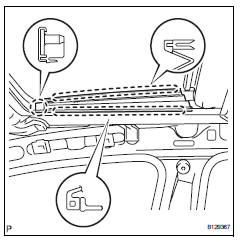
- Using a screwdriver, detach the claws and remove the garnish.
Hint:
Tape the screwdriver tip before use.
- Remove sliding roof side garnish rh
Hint:
Use the same procedures described for the lh side.
- Remove sliding roof glass sub-assembly
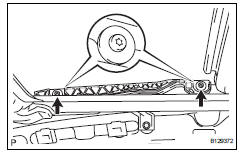
- Using a t25 "torx" driver, remove the 4 screws and glass.
- Pull the glass upward to remove it.
- Remove sliding roof weatherstrip
- Disconnect sliding roof drain hose
- Disconnect the 4 drain hoses.
- Remove sliding roof housing assembly
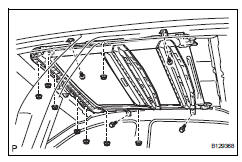
- Remove the 4 bolts, 8 nuts and housing.
Notice:
Be careful not to damage the curtain shield airbag when removing the housing.

 Removal (2006/01- )
Disconnect cable from negative battery
terminal
Caution:
Wait at least 90 seconds after disconnecting the
cable from the negative (-) battery terminal to
prevent airbag and seat belt preten ...
Other materials:
Removal
Drain engine coolant (see page co-6)
Disconnect cable from negative battery
terminal
Caution:
Wait at least 90 seconds after disconnecting the
cable from the negative (-) battery terminal to
prevent airbag and seat belt pretensioner activation.
Remove air cleaner cap (see page es-41 ...
Using the steering
wheel switches
The steering wheel switches can be used to operate a connected
cellular phone.
Operating a telephone using the steering wheel switches
Volume switch
Increase/decrease the volume
Press and hold:
continuously increase/
decrease the volume
Enter switch
Select an item
...
Installation
Hint:
Use the same procedures for the rh side and lh side.
The procedures listed below are for the lh side.
Install no. 2 Seat leg box protector
Attach the clip to install the protector.
Install the clip.
Install rear no. 1 Floor mat support side plate
Install rear no ...
