
Toyota RAV4 (XA40) 2013-2018 Service Manual: Speed sensor
Components
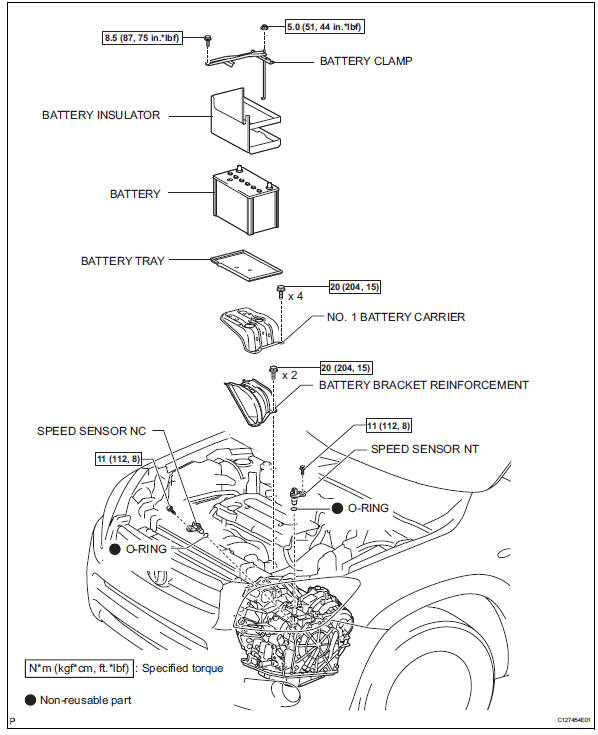
Removal
- Disconnect cable from negative battery terminal
Caution:
Wait at least 90 seconds after disconnecting the cable from the negative (-) battery terminal to prevent airbag and seat belt pretensioner activation.
- Remove battery
- Loosen the nut and remove the bolt and battery clamp.
- Remove the battery.
- Remove the battery tray.
- Remove the 4 bolts and battery carrier.
- Remove the 2 bolts and battery bracket reinforcement.
- Remove speed sensor nt
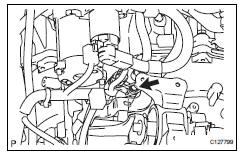
- Disconnect the sensor connector.
- Remove the bolt and sensor.
- Remove the o-ring from the sensor.
- Remove speed sensor nc
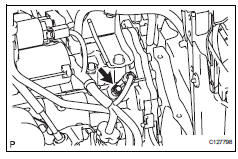
- Disconnect the sensor connector.
- Remove the bolt and sensor.
- Remove the o-ring from the sensor.
Inspection
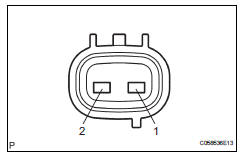
- Inspect speed sensor nt
Measure the resistance of the sensor.
Standard resistance 
- Inspect speed sensor nc
Measure the resistance of the sensor.
Standard resistance 
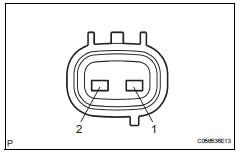
Installation
- Install speed sensor nc
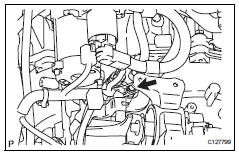
- Coat a new o-ring with atf.
- Install the o-ring to the sensor.
- Install the sensor with the bolt.
Torque: 11 n*m (112 kgf*cm, 8 ft.*Lbf)
- Connect the sensor connector.
- Install speed sensor nt
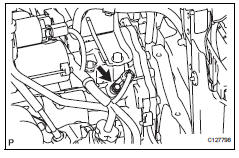
- Coat a new o-ring with atf.
- Install the o-ring to the sensor.
- Install the sensor with the bolt.
Torque: 11 n*m (112 kgf*cm, 8 ft.*Lbf)
- Connect the sensor connector.
- Install battery
- Install the battery bracket reinforcement with the 2 bolts.
Torque: 20 n*m (204 kgf*cm, 15 ft.*Lbf)
- Install the battery carrier with the 4 bolts.
Torque: 20 n*m (204 kgf*cm, 15 ft.*Lbf)
- Install the battery tray.
- Install the battery with the battery clamp.
Torque: 8.5 N*m (87 kgf*cm, 75 in.*Lbf) for bolt
5.0 N*m (51 kgf*cm, 44 in.*Lbf) for nut
- Connect cable to negative battery terminal
 Automatic transaxle fluid
On-vehicle inspection
Check transaxle fluid level
Hint:
Drive the vehicle so that the engine and transaxle are at
normal operating temperature.
Fluid temperature:
70 to 80°c (158 to 176°f ...
 Transmission wire
Components
Removal
Disconnect cable from negative battery
terminal
Caution:
Wait at least 90 seconds after disconnecting the
cable from the negative (-) battery terminal to
preven ...
Other materials:
Test mode procedure
Test mode check
Hint:
When entering the test mode, the tire pressure
warning ecu sets all the test dtcs first. After
completing the test mode for each inspection item, the
dtcs that are determined normal by the tire pressure
warning ecu will be erased.
The dtcs for other inspec ...
Front airbag sensor lh circuit malfunction
Description
The front airbag sensor lh consists of the diagnostic circuit, the frontal
deceleration sensor, etc.
If the center airbag sensor receives signals from the frontal deceleration
sensor, it determines whether or
not the srs should be activated.
Dtc b1615/14 is recorded when a ma ...
Positioning a floor jack
When raising your vehicle with a floor jack, position the jack correctly.
Improper placement may damage your vehicle or cause
injury.
Front
Rear
Caution
When raising your vehicle
Make sure to observe the following precautions to reduce the possibility of
death or serious injury:
...
