
Toyota RAV4 (XA40) 2013-2018 Owners Manual: Turning the high beam on/off manually
Switching to low beam
Pull the lever to original position.
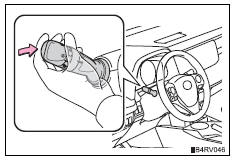
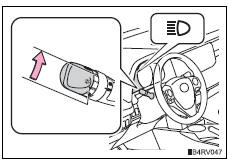
Switching to high beam
Turn the light switch to 
position.
The automatic high beam indicator will turn off and the high beam indicator will turn on.
The automatic high beam can be operated when
- Vehicles without a smart key system
The engine switch is in the “on� position.
- Vehicles with a smart key system
The engine switch is in ignition on mode.
Camera sensor detection information
- High beam may not be automatically turned off in the following situations:
- When oncoming vehicles suddenly appear from a curve
- When the vehicle is cut in front of by another
- When oncoming or preceding vehicles are hidden from sight due to repeated curves, road dividers or roadside trees
- When oncoming vehicles appear from the faraway lane on wide road
- When oncoming or preceding vehicles have no lights
- High beam may be turned off if an oncoming vehicle that is using fog lights without using the headlights is detected.
- House lights, street lights, red traffic signals, and illuminated billboards or signs may cause the high beam to turn off.
- The following factors may affect the amount of time taken to turn high beam on or off:
- The brightness of headlights, fog lights, and tail lights of oncoming and preceding vehicles
- The movement and direction of oncoming and preceding vehicles
- When a oncoming or preceding vehicle only has operational lights on one side
- When a oncoming or preceding vehicle is a two-wheeled vehicle
- The condition of the road (gradient, curve, condition of the road surface etc.)
- The number of passengers and amount of luggage
- High beam may be turned on or off when unexpected by the driver.
- In the situations below, the system may not be able to correctly detect the surrounding brightness levels, and may flash or expose nearby pedestrians to the high beam. Therefore, you should consider turning the high beams on or off manually rather than relying on the automatic high beam system.
- In bad weather (rain, snow, fog, sandstorms etc.)
- The windshield is obscured by fog, mist, ice, dirt etc.
- The windshield is cracked or damaged.
- The camera sensor is deformed or dirty.
- The camera sensor temperature is extremely high.
- Surrounding brightness levels are equal to those of headlights, tail lights or fog lights.
- Vehicles ahead have headlights that are either switched off, dirty, are changing color, or are not aimed properly.
- When driving through an area of intermittently changing brightness and darkness.
- When frequently and repeatedly driving ascending/descending roads, or roads with rough, bumpy or uneven surfaces (such as stone-paved roads, gravel tracks etc.).
- When frequently and repeatedly taking curves or driving on a winding road.
- There is a highly reflective object ahead of the vehicle, such as a sign or a mirror
- The back of a vehicle ahead is highly reflective, such as a container on a truck.
- The vehicle’s headlights are damaged or dirty.
- The vehicle is listing or tilting, due to a flat tire, a trailer being towed etc.
- The high beam and low beam are repeatedly being switched between in an abnormal manner.
- The driver believes that the high beam may be causing problems or distress to other drivers or pedestrians nearby.
Temporarily lowering sensor sensitivity
The sensitivity of the sensor can be temporarily lowered.
- Vehicles without a smart key system: turn the engine switch to the
“lock� position while the following conditions are met.
Vehicles with a smart key system: turn the engine switch off while the following conditions are met.
- The headlight switch is in

. - The headlight switch lever is in high beam position.
- Vehicles without a smart key system: turn the engine switch to the “on�
position.
Vehicles with a smart key system: turn the engine switch to ignition on mode.
- Within 5 seconds after 2 , repeat pulling the headlight switch lever to the original position then pushing it to the high beam position quickly 9 times, then leave the lever in high beam position.
Automatic high beam (headlights) may turn on even the vehicle is stopped.
If the automatic high beam indicator turns to yellow...
It may indicate a malfunction in the system. Contact your toyota dealer.
Customization
The automatic high beam can be turned off.
Caution
Limitations of the automatic high beam
Do not rely on the automatic high beam. Always drive safely, taking care to observe your surroundings and turning high beam on or off manually if necessary.
Notice
Notes when using the automatic high beam system
Observe the following to ensure that the automatic high beam functions correctly.
- Do not touch the camera sensor.
- Do not subject the camera sensor to a strong impact.
- Do not disassemble the camera sensor.
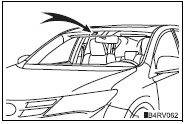
- Do not spill liquid onto the camera sensor.
- Do not apply window tinting or stickers to the camera sensor or the area of windshield near the camera sensor.
- Do not place items on the dashboard. There is a possibility that the camera sensor will mistake items reflected in the windshield for streetlights, the headlights of other vehicles, etc.
- Do not install a parking tag or any other accessories near or around the camera sensor.
- Do not overload the vehicle.
- Do not modify the vehicle.
- Do not replace windshield with non-genuine windshield.
Contact your toyota dealer.
- Do not replace headlights with non-genuine headlights.
Contact your toyota dealer.
 High beam automatic turning on or off conditions
When all of the following conditions are fulfilled, high beam will be
automatically turned on:
Vehicle speed is above approximately 21 mph (34 km/h).
The area ahead of the vehicle is dark.
Th ...
 Fog light switch
The fog lights secure excellent visibility in difficult driving
conditions,
such as in rain and fog.
(U.S.A.) Or (canada)
turns the fog lights off
Turns the fog lights on
Fog light ...
Other materials:
Front occupant classification sensor rh circuit malfunction
Description
The front occupant classification sensor rh circuit consists of the occupant
classification ecu and the
front occupant classification sensor rh.
Dtc b1781 is recorded when a malfunction is detected in the front occupant
classification sensor rh
circuit.
Wiring diagram
...
On-vehicle inspection
Check camshaft timing oil control valve
assembly
Check the operation.
Connect the intelligent tester to the dlc3.
Turn the ignition switch on.
Turn the intelligent tester main switch on.
Start and warm up the engine.
Select the menu items: diagnosis /
enhanced obd ii / ...
Dtc check / clear
Notice:
When the diagnosis system is changed from normal
mode to check mode or vice versa, all dtcs and freeze
frame data recorded in normal mode are erased. Before
changing modes, always check and make a note of any
dtcs and freeze frame data.
Hint:
Dtcs which are stored in the ecm can be ...
