
Toyota RAV4 (XA40) 2013-2018 Service Manual: Fog light assembly
Components
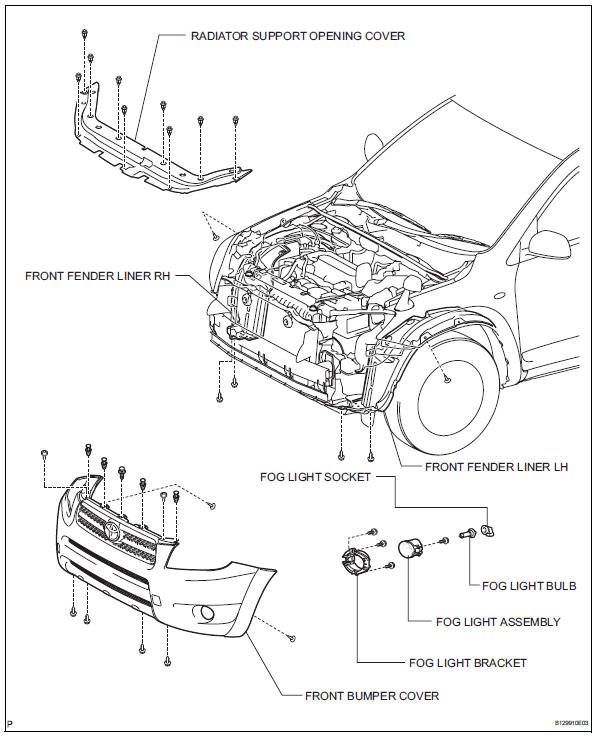
Removal
Hint:
- Use the same procedures for the rh and lh sides.
- The procedures listed below are for the lh side.
- Disconnect cable from negative battery terminal
Caution:
Wait at least 90 seconds after disconnecting the cable from the negative (-) battery terminal to prevent airbag and seat belt pretensioner activation.
- Remove front fender liner lh (see page et-6)
- Remove front fender liner rh (see page et-4)
- Remove radiator support opening cover (see page et-4)
- Remove front bumper cover (see page et-5)
- Remove fog light assembly
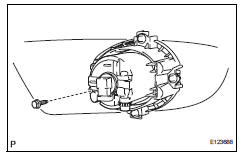
- Disconnect the connector.
- Remove the bolt and fog light.
Disassembly
Hint:
- Use the same procedures for the rh side and lh sides.
- The procedures listed below are for the lh side.
- Remove fog light bulb
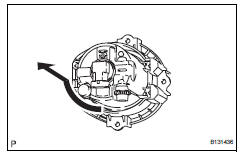
- Turn the bulb in the direction indicated by the arrow and pull to remove it.
Adjustment
- Vehicle preparation for fog light aim adjustment
- Prepare the vehicle:
- Ensure that the vehicle has no damage or deformation around the fog lights.
- Fill up the fuel tank.
- Make sure that all of the different types of oil in the vehicle (engine oil, etc.) Are filled to the specified levels.
- Make sure that the coolant is filled to the specified level.
- Inflate the tires to the appropriate pressure.
- Place the spare tire, tools, and jack in their original positions.
- Unload the vehicle.
- Have a person that weighs approximately 55 kg (121 lb) sit in the driver seat.
- Preparation for fog light aiming (using screen)
- Prepare the vehicle according to the following conditions:
- Move the vehicle to a location that is sufficiently dark so that the fog light cutoff line can be visually checked. The cutoff line is an imaginary plane below which fog light light is projected and above which light is not projected.
- Move the vehicle to a level surface.
- Point the front of the vehicle at a wall. The wall must be perpendicular to the surface that the vehicle is on.
- Position the vehicle 10 m (32.8 Ft.) From the wall.
- Push down on the vehicle several times to settle the suspension.
Hint:
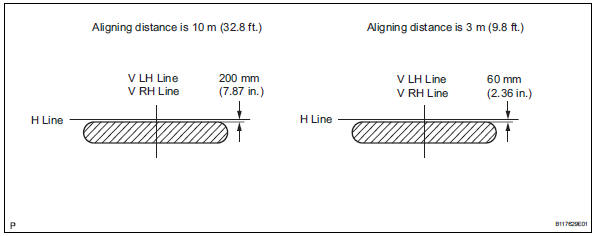
A distance of 10 m (32.8 Ft.) Between the vehicle and the wall is necessary for proper aim adjustment. If unavailable, secure a distance of exactly 3 m (9.8 Ft.). In the illustrations below, view the part of the illustration applicable to the distance from the vehicle to the wall.
Notice:
Be careful not to damage the suspension.
- Prepare a piece of thick white paper that is approximately 2 m (6.6 Ft.) (Height) x 4 m (13.1 Ft.) (Width) to use as a screen.
- Draw a vertical line down the center of the screen (v line).
- Set the screen as shown in the illustration.
Hint:
- Stand the screen perpendicular to the ground.
- Align the v line on the screen with the center of the vehicle.
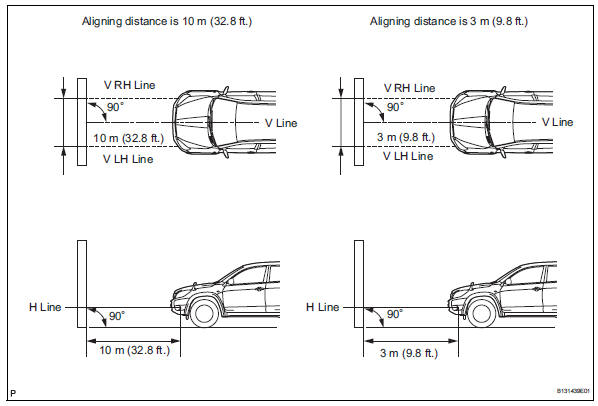
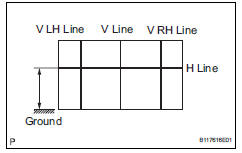
- Draw base lines (h line, v lh and v rh lines) on the screen as shown in the illustration.
H line (fog light height): draw a horizontal line across the screen so that it passes through the center marks. The h line should be at the same height as the bulb center marks of the fog lights.
V lh line, v rh line (center mark position of lh and rh fog lights): draw 2 vertical lines so that they intersect the h line at each center mark.
- Inspect fog light aiming
- Choose a fog light to inspect first. Cover or disconnect the connector of the other fog light to prevent light from that fog light from affecting the fog light aiming inspection.
- Start the engine.
Notice:
Engine rpm must be 1,500 or more.
- Turn on the fog lights and make sure that the cutoff line is within the specified area shown in the illustration.
- Adjust fog light aiming
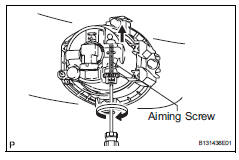
- Adjust the fog light aim into the specified range by turning the aiming screw with a screwdriver.
Notice:
If the screw is tightened too much, loosen it and then retighten it so that the final turn of the screw is in the clockwise direction.
 Headlight assembly
Components
Removal
Hint:
Use the same procedures for the rh and lh sides.
The procedures listed below are for the lh side.
Disconnect cable from negative battery
terminal
Rem ...
 Rear combination light assembly
Components
Removal
Hint:
Use the same procedures for the rh and lh sides.
The procedures listed below are for the lh side.
Disconnect cable from negative battery
terminal
Cautio ...
Other materials:
Installation
Hint:
A bolt without a torque specification is shown in the standard
bolt chart (see page ss-2).
Install front seat inner belt assembly (for power seat)
Install the front seat inner belt assembly with the
nut.
Torque: 42 n*m (428 kgf*cm, 31 ft.*Lbf)
Notice:
Do not overlap the ...
Indications on multi-information
display
Vehicles with 7-inch display
LTA indicator
The illumination condition of the
indicator informs the driver of the
system operation status.
Illuminated in white: LTA system is
operating.
Illuminated in green: Steering
wheel assistance of the steering
assist function or lane centering
function is ...
Rear window and outside rear view mirror defoggers
These features are used to defog the rear window, and to
remove raindrops, dew and frost from the outside rear view mirrors
(if equipped).
Vehicles with a manual air conditioning system
On/off
The defoggers will automatically
turn off after approximately 15 minutes.
Vehicles with an au ...
