
Toyota RAV4 (XA40) 2013-2018 Owners Manual: Glove box
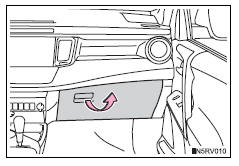
Pull up the lever to open the glove box.
Power back door main switch (if equipped)
The power back door main switch is located in the glove box.
 List of storage features
Glove box
Bottle holders
Console box
Cup holders
Storage boxes
Caution
Items that should not be left in the storage spaces
Do not leave glasses, lighters or spray cans in the stora ...
 Console box
Lift the lid while pulling up the
lever to release the lock.
When using the console box lid as an armrest (vehicles with slide
function)
Slide the console box lid forward as
needed. Pull the ...
Other materials:
Front seat assembly (for power seat type lh side)
Components
...
On-vehicle inspection
Connect intelligent tester
Connect the intelligent tester to the dlc3.
Start the engine and idle it.
Select the active test mode on the intelligent tester.
Hint:
Please refer to the intelligent tester operator's
manual for further details.
Check actuator motor operation
...
Low battery positive voltage
Description
When there is an abnormality in the power supply circuit of the brake
actuator (skid control ecu), the skid
control ecu sets a dtc and the operation is prohibited by the fail-safe
function. This dtc is set when the
voltage supplied to terminal ig1 is outside the dtc detection ...
