
Toyota RAV4 (XA40) 2013-2018 Service Manual: How to use this manual
General information
- General description
- This manual is written in accordance with sae j2008.
- Diagnosis
- Removing / installing, replacing, disassembling / reassembling, checking and adjusting
- Final inspection
- The following procedures are omitted from this manual. However, these procedures must be performed.
- Use a jack or lift to perform operations.
- Clean all removed parts.
- Perform a visual check.
- Index
- An alphabetical index section is provided at the end of the manual as a reference to help you find the item to be repaired.
- Preparation
- Use of special service tools (sst) and special service materials (ssm) may be required, depending on the repair procedure. Be sure to use sst and ssm when they are required and follow the working procedures properly. A list of sst and ssm is in the "preparation" section of this manual.
- Repair procedures
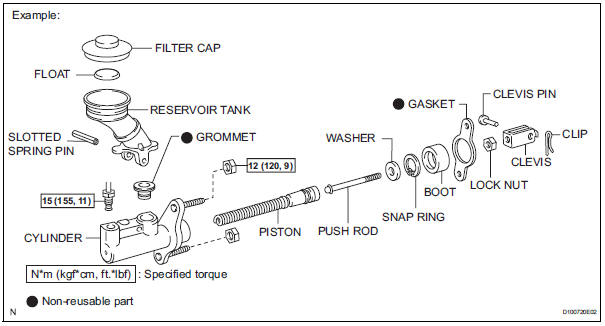
- A component illustration is placed under the title where necessary.
- Non-reusable parts, grease application areas,
precoated parts and torque specifications are noted
in the component illustrations.
The following illustration is an example.
- Torque specifications, grease application areas and
non-reusable parts are emphasized in the
procedures.
Hint: there are cases where such information can only be explained by using an illustration. In these cases, torque, oil and other information are described in the illustration.
- Only items with key points are described in the text.
What to do and other details are explained using illustrations next to the text. Both the text and illustrations are accompanied by standard values and notices.

- Illustrations of similar vehicle models are sometimes used. In these cases, minor details may be different from the actual vehicle.
- Procedures are presented in a step-by-step format.
- Service specifications
- Specifications are presented in boldface text throughout the manual. The specifications are also found in the "service specifications" section for reference.
- Term definitions

- International system of units
- The units used in this manual comply with the
international system of units (si) standard. Units
from the metric system and english system are also
provided.
Example: torque: 30 n*m (310 kgf*cm, 22 ft.*Lbf)
 Introduction
...
 Identification information
Vehicle identification and serial numbers
Vehicle identification number
The vehicle identification number is stamped on the
vehicle identification number plate and on the
certification l ...
Other materials:
Reassembly
Bearing position
Standard bearing position
Install differential gear lube apply tube
Install the apply tube and clamp to the transaxle
housing with the bolt.
Torque: 9.8 N*m (100 kgf*cm, 87 in.*Lbf)
Notice:
Make sure to insert the pipe to the stopper.
Instal ...
Intake air temperature circuit malfunction
Description
The intake air temperature (iat) sensor, mounted on the mass air flow (maf)
meter, monitors the iat.
The iat sensor has a built-in thermistor with a resistance that varies according
to the temperature of the
intake air. When the iat is low, the resistance of the thermist ...
Outside vehicle
General maintenance
Performing the following maintenance checks on the vehicle
is the owner's responsibility. The owner may perform the
maintenance or take the vehicle to a service center. Check
the parts of the vehicle described below on a daily basis. In
most cases, special tools are not requ ...
