
Toyota RAV4 (XA40) 2013-2018 Service Manual: Hydraulic test
- Measure line pressure
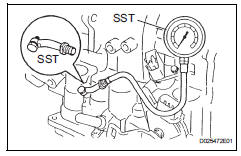
Notice:
- Perform the test at the normal operating atf temperature: 50 to 80°c (122 to 176°f).
- The line pressure test should always be performed with at least 2 people. One person should observe the condition of the wheels or wheel chocks while the other is performing the test.
- Be careful to prevent sst's hose from interfering with the exhaust pipe.
- This test must be performed after checking and adjusting the engine.
- Perform the test with the a/c off.
- When conducting the stall test, do not continue for more than 10 seconds.
- Warm up the atf.
- Remove the test plug on the transaxle case center right side and connect sst.
Sst 09992-00095 (09992-00231, 09992-00271)
- Fully apply the parking brake and chock the 4 wheels.
- Start the engine and check the idling speed.
- Keep your left foot firmly on the brake pedal and move the shift lever to d.
- Measure the line pressure when the engine is idling.
- Depress the accelerator pedal as much as possible with your right foot. Quickly read the highest line pressure reading when the engine speed reaches stall speed.
- Perform the measure line pressure test again with the shift lever on r.
Specified line pressure:

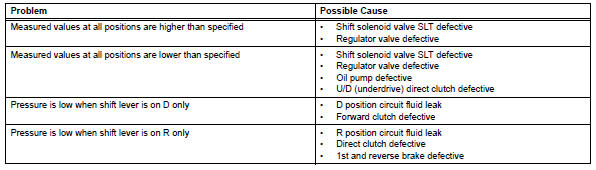
Evaluation:
 Mechanical system tests
Stall speed test
Hint:
This test is to check the overall performance of the
engine and transaxle.
Notice:
Do not perform the stall speed test longer than 5
seconds.
To ensure safety, ...
 Manual shifting test
Manual shifting test
Hint:
Through this test, it can be determined whether the
trouble occurs in the electrical circuit or if it is a
mechanical problem in the transaxle.
If any abnorm ...
Other materials:
Removal
Disconnect cable from negative battery
terminal
Caution:
Wait at least 90 seconds after disconnecting the
cable from the negative (-) battery terminal to
prevent airbag and seat belt pretensioner activation.
Remove rear door scuff plate rh (see page
ir-29)
Remove package tray trim ...
Abs control system malfunction
Description
This dtc is output when the vsc system detects a malfunction in the abs
system.
Inspection procedure
Check dtc for abs system
Clear the dtc (see page bc-47).
Turn the ignition switch on.
Check if the same dtc is recorded (see page bc-47).
Result
Repair ...
System description
General
This system has the following functions: manual slide
open and close; auto slide open and close; manual tilt up
and down; auto tilt up and down; jam protection; and key
off operation.
Function of main component
System operation
The sliding roof has the following ...
