
Toyota RAV4 (XA40) 2013-2018 Service Manual: Installation
Hint:
A bolt without a torque specification is shown in the standard bolt chart (see page ss-2).
- Install front seat inner belt assembly (for power seat)
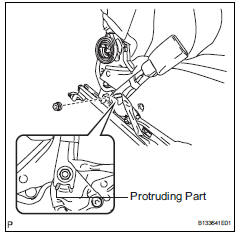
- Install the front seat inner belt assembly with the nut.
Torque: 42 n*m (428 kgf*cm, 31 ft.*Lbf)
Notice:
Do not overlap the anchor part of the seat belt and protruding part of the seat adjuster.
- For driver seat: attach the 2 clamps and connect the 2 connector.
- For passenger seat: attach the clamp and connect the 2 connector.
- Install front seat inner belt assembly (for manual seat)
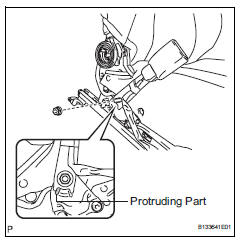
- Install the front seat inner belt assembly with the nut.
Torque: 42 n*m (428 kgf*cm, 31 ft.*Lbf)
Notice:
Do not overlap the anchor part of the seat belt and protruding part of the seat adjuster.
- For driver seat: attach the 3 clamps and connect the 2 connector.
- For passenger seat: attach the 2 clamps and connect the connector.
- Install front seat cushion inner shield lh (see page se-21)
- Install front seat cushion inner shield rh (see page se-21)
- Install front seat assembly (for power seat) (see page se-27)
- Install front seat assembly (for manual seat) (see page se-11)
- Install front seat track bracket outer cover lh (see page se-23)
- Install front seat track bracket inner cover lh (see page se-23)
- Install front seat track bracket inner cover rh
- Use the same procedures described for the lh side.
- Install front seat track bracket outer cover rh
- Use the same procedures described for the lh side.
- Connect cable to negative battery terminal
 Removal
Disconnect cable from negative battery
terminal
Caution:
Wait at least 90 seconds after disconnecting the
cable from the negative (-) battery terminal to
prevent airbag and seat belt preten ...

Other materials:
Steering angle sensor communication stop mode
Description
Wiring diagram
Inspection procedure
Notice:
Turn the ignition switch off before measuring the resistances of the
main wire and the branch
wire.
After the ignition switch is turned off, check that the key reminder
warning system and light
reminder warning system ...
How to proceed with troubleshooting
Hint:
Use these procedures to troubleshoot the sliding roof
system.
*: Use the intelligent tester.
Vehicle brought to workshop
Inspect battery voltage
Standard voltage:
11 to 14 v
If the voltage is below 11 v, recharge or replace the battery
before proceeding.
Inspe ...
Brake system malfunction
Description
This dtc is output when the vsc system has a problem. Check the vsc system
when this dtc is
output.
Inspection procedure
Hint:
This circuit uses can communication. Therefore, if there are any malfunctions
in the communication
circuit, one or more dtcs in the can communi ...
