
Toyota RAV4 (XA40) 2013-2018 Service Manual: Installation
- Install upper instrument panel
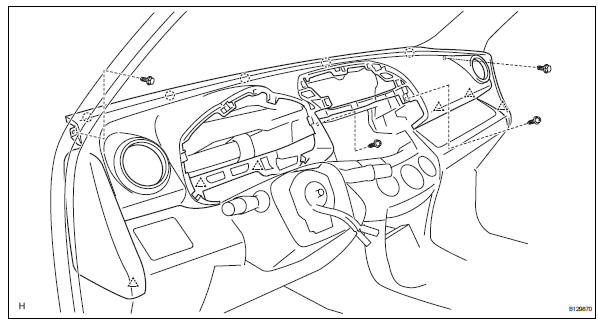
- Attach the 6 clips and 5 claws to install the instrument panel.
- Connect the connectors and clamps.
- Install the 2 bolts and 2 screws.
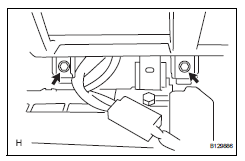
- Connect the passenger airbag connector.
- Install the 2 bolts to the passenger airbag.
Torque: 20 n*m (204 kgf*cm, 15 ft.*Lbf)
- Install front pillar garnish lh (see page ir- 57)
- Install front pillar garnish rh (see page ir- 58)
- Install glove compartment door assembly (see page ip-25)
- Install instrument panel register assembly center
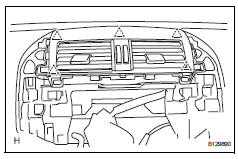
- Attach the 5 clips to install the instrument panel register.
- Install radio receiver
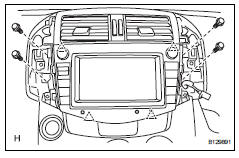
- Connect the connectors.
- Attach the 4 clips to install the radio receiver.
- Install the 4 bolts.
- Install no. 1 Instrument cluster finish panel center
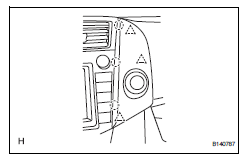
- Connect the connector.
- Attach the 3 clips and 3 claws to install the cluster finish panel.
- Install no. 2 Instrument cluster finish panel center
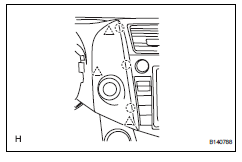
- Connect the connector.
- Attach the 3 clips and 3 claws to install the cluster finish panel.
- Install combination meter assembly
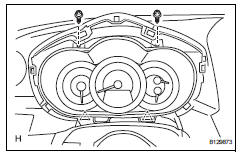
- Connect the connector.
- Attach the 2 clips to install the combination meter.
- Install the 2 screws.
- Install instrument cluster finish panel sub-assembly
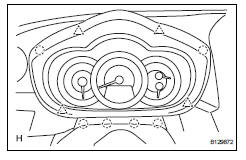
- Attach the 4 clips and 6 claws to install the instrument cluster finish panel.
- Connect cable to negative battery terminal
- Check srs warning light
- Check the srs warning light (see page rs-37).
 Reassembly
Install cooler (solar sensor) thermistor
(for automatic air conditioning system)
Install automatic light control sensor
(for automatic light control system)
Install front passenger airbag a ...
 Lower instrument panel
Precaution
Precaution for vehicle with srs airbag and
seat belt pretensioner
Some operations in this section may affect the srs
airbags and seat belt pretensioner. Prior to
performing ...
Other materials:
Oil pump
Components
Removal
Remove chain sub-assembly
Remove the chain (see page em-22).
Remove oil pump assembly
Remove the 3 bolts, oil pump and gasket.
Disassembly
Remove oil pump strainer
Remove the 2 nuts, oil pump strainer and gasket.
...
Removal
Hint:
Use the same procedures for the rh side and lh side.
The procedures listed below are for the lh side.
Remove roof drip side finish moulding lh
Remove the 2 roof drip moulding joint covers from
the vehicle body.
Remove the roof drip side finish moulding and no. 2
Center ...
Diagnosis system
Description
The occupant classification ecu controls the functions of
the occupant classification system on the vehicle. Data
of the occupant classification system can be read in the
data link connector 3 (dlc3) of the vehicle. When the
system seems to be malfunctioning, use the intelligen ...
