
Toyota RAV4 (XA40) 2013-2018 Service Manual: Problem symptoms table
Hint:
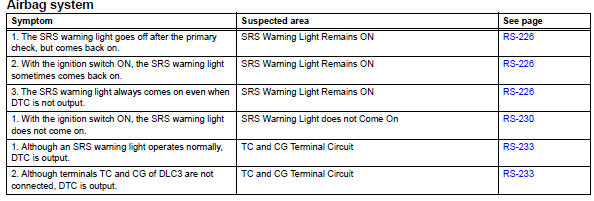
- Use the table below to help determine the cause of the problem symptom. The potential causes of the symptoms are listed in order of probability in the "suspected area" column of the table. Check each symptom by checking the suspected areas in the order they are listed. Replace parts as necessary.
- Proceed to the troubleshooting procedures for each circuit in the table below.
 How to proceed with troubleshooting
Hint:
Use these procedures to troubleshoot the supplemental
restraint system.
*: Use the intelligent tester.
Vehicle brought to workshop
Inspect battery voltage*
Standard volt ...
 Terminals of ecu
Center airbag sensor assembly (w/ curtain
shield airbag)
Center airbag sensor assembly (w/o curtain
shield airbag)
...
Other materials:
Short in front passenger side pretensioner squib circuit
Description
The front passenger side front pretensioner squib circuit consists of the
center airbag sensor and the front
seat outer belt rh.
This circuit instructs the srs to deploy when the deployment conditions are met.
These dtcs are recorded when a malfunction is detected in th ...
Starter relay
On-vehicle inspection
Disconnect cable from negative battery
terminal
Caution:
Wait at least 90 seconds after disconnecting the
cable from the negative (-) battery terminal to
prevent airbag and seat belt pretensioner activation.
Remove starter relay
Remove the starter relay fr ...
Data list / active test
Read data list
Hint:
Using the intelligent tester's data list allows switch,
sensor, actuator and other item values to be read without
removing any parts. Reading the data list early in
troubleshooting is one way to save time.
Connect the intelligent tester (with can vim) to the
...
