
Toyota RAV4 (XA40) 2013-2018 Owners Manual: Rear seats
Adjustment procedure
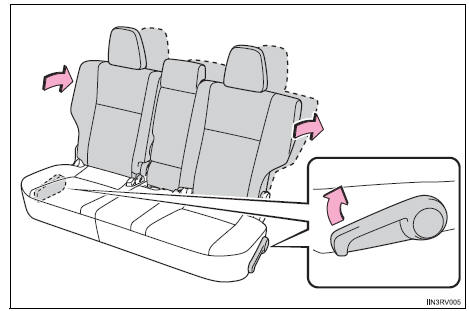
Pull up the lever. Then lean back to the desired angle and release the lever.
When a person sits in the rear center position, align all seatbacks at the same angle.
Folding down the rear seatbacks
Before folding down the rear seatbacks
- Stow the rear center seat belt.
- Stow the rear seat belt buckles.
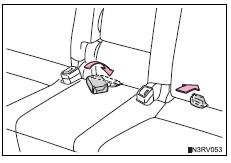
- Lower the head restraint to the lowest position
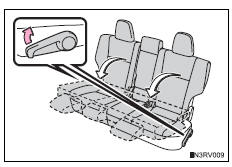
Folding down rear seatbacks
Pull the seatback angle adjustment lever and fold down the seatback.
Caution
When folding the rear seatbacks down
Observe the following precautions. Failure to do so may result in death or serious injury.
- Do not fold the seatbacks down while driving.
- Stop the vehicle on level ground, set the parking brake and shift the shift lever to p.
- Do not allow anyone to sit on a folded seatback or in the luggage compartment while driving.
- Do not allow children to enter the luggage compartment.
Seat adjustment
- To reduce the risk of sliding under the lap belt during a
collision, do not
recline the seat more than necessary.
If the seat is too reclined, the lap belt may slide past the hips and apply restraint forces directly to the abdomen, or your neck may contact the shoulder belt, increasing the risk of death or serious injury in the event of an accident.
Adjustments should not be made while driving as the seat may unexpectedly move and cause the driver to lose control of the vehicle.
- Be careful not to get hands or feet pinched between the rear console box and the rear seat when folding down the rear seatback.
Caution
After returning the rear seatback to the upright position
Observe the following precautions. Failure to do so may result in death or serious injury.
- Make sure the seatback is securely locked by pushing it forward and rearward on the top.
- Check that the seat belts are not twisted or caught in the seatback.
Notice
Stowing the seat belts
The seat belts and the buckles must be stowed before you fold down the rear seatbacks.
 Front seats
Adjustment procedure
Manual seat
Seat position adjustment lever
Seatback angle adjustment
lever
Vertical height adjustment
lever (driver’s side only)
Power seat (driver’s side ...
 Driving position memory
This feature automatically adjusts the driver’s seat to suit your
preferences. ...
Other materials:
Engine compartment
Engine coolant reservoir
Engine oil filler cap
Battery
Brake fluid reservoir
Fuse box
Radiator
Condenser
Electric cooling fans
Engine oil level dipstick
Washer fluid tank
Engine oil
With the engine at operating temperature and turned off, check the oil
level on the dips ...
How to proceed with troubleshooting
Hint:
Use these procedures to troubleshoot the tire pressure
warning system.
*: Use the intelligent tester.
Vehicle brought to workshop
Inspect battery voltage
Standard voltage:
11 to 14 v
If the voltage is below 11 v, recharge or replace the battery
before proceeding.
...
Stop light switch circuit
Description
While driving with the cruise control, if the ecm detects that the brake
pedal is depressed, the cruise
control operation will be canceled. The stop light switch sends brake pedal
status signals to the ecm.
When the brake pedal is not depressed, terminal st1- is equal to the ...
