
Toyota RAV4 (XA40) 2013-2018 Service Manual: Removal
Notice:
Do not heat the vehicle body, emblem and name plate excessively.
Hint:
When removing the emblem and name plate, heat the vehicle body, emblem and name plate using a heat light.
Standard heating temperature

- Remove no. 1 Back door emblem assembly
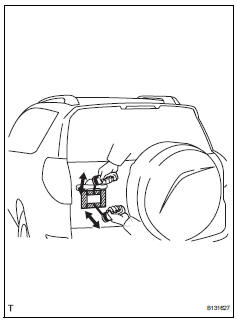
- Put protective tape around the emblem.
- Insert a piano wire between the vehicle body and emblem.
- Tie objects that can serve as handles (for example, wooden blocks) to both wire ends.
- Pull the piano wire and scrape off the double-sided tape that holds the emblem to the vehicle body.
Notice:
- If reusing the emblem, take care not to damage the emblem.
- Be careful not to damage the vehicle body.
- Remove back door name plate
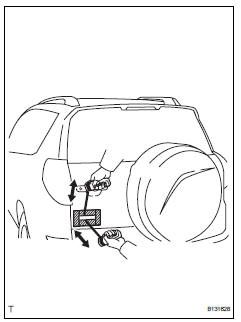
- Put protective tape around the name plate.
- Insert a piano wire between the vehicle body and name plate.
- Tie objects that can serve as handles (for example, wooden blocks) to both wire ends.
- Pull the piano wire and scrape off the double-sided tape that holds the name plate to the vehicle body.
Notice:
- If reusing the name plate, take care not to damage the name plate.
- Be careful not to damage the vehicle body.
- Remove no. 1 Back door emblem
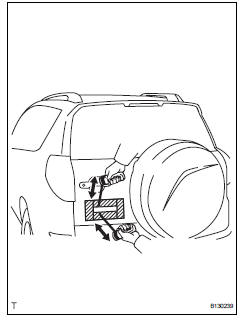
- Put protective tape around the emblem.
- Insert a piano wire between the vehicle body and emblem.
- Tie objects that can serve as handles (for example, wooden blocks) to both wire ends.
- Pull the piano wire and scrape off the double-sided tape that holds the emblem to the vehicle body.
Notice:
- If reusing the emblem, take care not to damage the emblem.
- Be careful not to damage the vehicle body.
- Remove no. 4 Back door name plate (for 4wd)
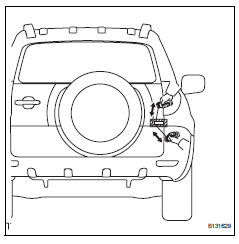
- Put protective tape around the name plate.
- Insert a piano wire between the vehicle body and name plate.
- Tie objects that can serve as handles (for example, wooden blocks) to both wire ends.
- Pull the piano wire and scrape off the double-sided tape that holds the name plate to the vehicle body.
Notice:
- If reusing the name plate, take care not to damage the name plate.
- Be careful not to damage the vehicle body.
 Components
...
 Installation
Notice:
Do not heat the vehicle body, emblem and name plate
excessively.
Hint:
When installing the emblem and name plate, heat the vehicle
body, emblem and name plate using a heat light.
Standar ...
Other materials:
SRS airbags
The SRS airbags inflate when the vehicle is subjected to certain
types of severe impacts that may cause significant injury
to the occupants. They work together with the seat belts to
help reduce the risk of death or serious injury.
SRS airbag system
â– Location of the SRS airbags
SRS front airbags ...
Evap system
Related dtcs
If any evap system dtcs are set, the malfunctioning area can be determined
using the table below.
Notice:
If the reference pressure difference between the first and second checks
is greater than the
specification, all the dtcs relating to the reference pressure (p043e, p ...
Check for intermittent problems
Check for intermittent problems
Hint:
A momentary interruption (open circuit) in the connectors
and/or wire harness between the sensors and ecus can
be detected by using the ecu data list function of an
intelligent tester.
Turn the ignition switch off and connect the
intelligent test ...
