
Toyota RAV4 (XA40) 2013-2018 Service Manual: Check mode procedure
- Check mode (signal check)
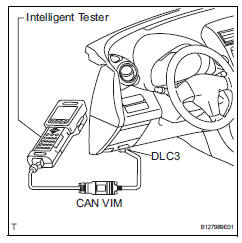
- Connect the intelligent tester (with can vim) to the dlc3.
- Turn the ignition switch on.
- Select the "signal check", and continue checking with the intelligent tester.
Notice:
Select the "signal check" from the "dtc check" screen displayed on the intelligent tester to clear the output dtcs (both present and past).
Hint:
- Check mode is more sensitive to malfunctions than normal mode.
- If the normal system code is output in normal mode even when a sensor signal malfunction is suspected, perform the inspection in check mode.
 Dtc check / clear
Check dtc (using sst (check wire))
Check the dtcs (present trouble code).
Turn the ignition switch on, and wait for
approximately 60 seconds.
Using sst, connect terminals 13(tc) ...
 Data list / active test
Read data list
Hint:
Using the intelligent tester's data list allows switch,
sensor, actuator and other item values to be read without
removing any parts. Reading the data list early in
trou ...
Other materials:
Rear wiper rubber
Components
Removal
Remove rear wiper blade assembly
Rotate and remove the cap as described in the
"remove" procedures.
Raise the arm and blade.
Raise the wiper blade to the position where the claw
detach with a ''click'' sound, as shown in the
illustrat ...
Terminals of ecu (2006/01- )
Check air conditioning amplifier
Measure the voltage and resistance of the
connectors.
Hint:
Check from the rear of the connector while it is
connected to the air conditioning amplifier.
Hint:
*: For 2gr-fe
Using an oscilloscope, check waveform 1.
A/c compressor* ...
List of storage features
Location of the storage features
Open tray
Auxiliary boxes
Bottle holders
Console box
Cup holders
Glove box
WARNING
â– Items that should not be left
in the vehicle
Do not leave glasses, lighters or
spray cans in the storage spaces,
as this may cause the following
when cabin temperature beco ...
