
Toyota RAV4 (XA40) 2013-2018 Service Manual: Rear wiper rubber
Components
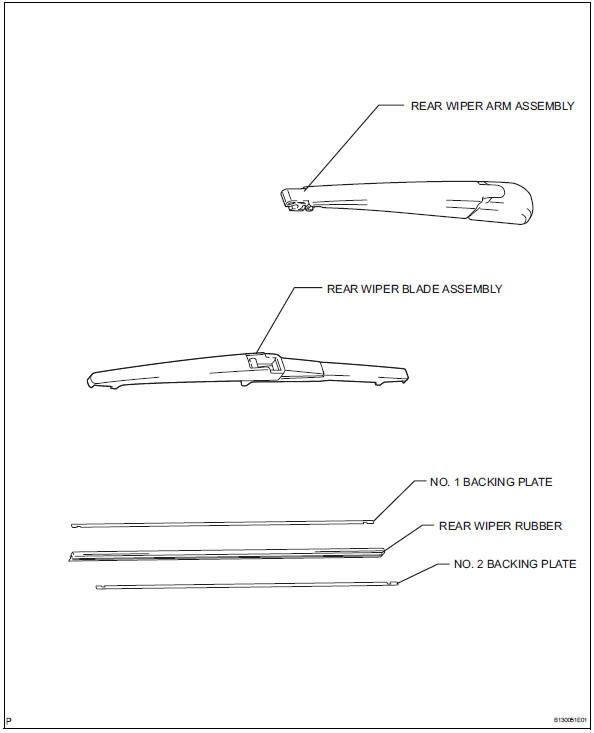
Removal
- Remove rear wiper blade assembly
- Rotate and remove the cap as described in the "remove" procedures.
- Raise the arm and blade.
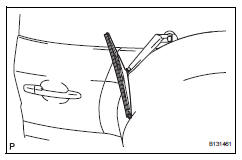
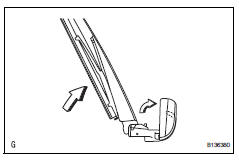
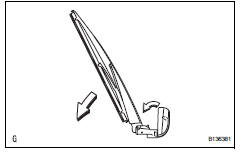
- Raise the wiper blade to the position where the claw detach with a ''click'' sound, as shown in the illustration.
Notice:
Be careful not to damage the claw.
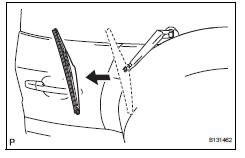
- Pull the wiper blade straight toward the left side of the vehicle to remove it from the wiper arm.
Notice:
Do not fold the wiper arm with the wiper blade removed. The arm tip may damage the back door glass surface.
- Remove rear wiper rubber
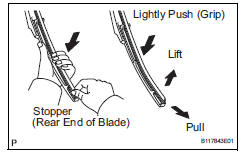
- Lift and pull the end of the wiper rubber protruding from the blade stopper as shown in the illustration.
Notice:
Do not forcibly pull out the wiper rubber. The backing plates will be deformed or the blade claws will be damaged.
Hint:
Lightly pushing the rubber between the ends and middle will allow it to be removed more easily.
Installation
- Install rear wiper rubber
- Install the no. 1 And no. 2 Backing plates as shown in the illustration.
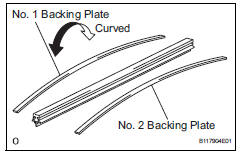
Notice:
Install the backing plates facing the correct direction.
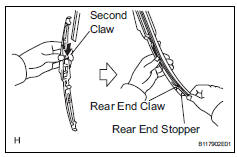
- Insert the wiper rubber from the front end of the wiper blade to the rear end through the second claw.
- After pushing the wiper rubber through the rear end claw, allow it to stick out from the rear end stopper.
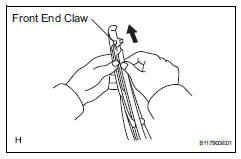
- Slide the wiper rubber through the front end claw.
- Install rear wiper blade assembly
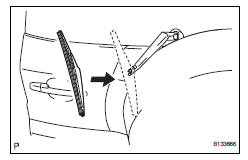
- Push the wiper blade straight toward the right side of the vehicle to install it to the wiper arm.
- Lower the arm and blade.
- Rotate and install the cap.
 Rear wiper motor
Components
Removal
Disconnect cable from negative battery
terminal
Caution:
Wait at least 90 seconds after disconnecting the
cable from the negative (-) battery terminal to
prevent ai ...
 Wiper switch
Precaution
Precaution for vehicle with srs
Some procedures in this section may affect the
supplemental restraint system (srs). Prior to
performing the procedures, read the srs section's
...
Other materials:
Location of the interior lights
Rear interior light
Front interior lights/personal lights
Open tray lights (if equipped)*
Footwell lights (if equipped)*
Front cup holder lights (if equipped)*
*: These lights turn on when a door is unlocked.
When the shift lever is in a position other than P, the brightness of these
ligh ...
Removal
(2006/01- )
Remove front wheel
Drain automatic transaxle fluid
Drain the automatic transaxle fluid for u140f (see
page ax-147).
Drain the automatic transaxle fluid for u241e (see
page ax-146).
Drain the automatic transaxle fluid for u151f (see
page ax-173).
Remove front axle hub nut ( ...
Fog light relay
On-vehicle inspection
Inspect front fog light relay
Remove the front fog relay from the no. 6 Relay
block.
Measure the resistance of the relay.
Standard resistance
If the result is not as specified, replace the relay. ...
