
Toyota RAV4 (XA40) 2013-2018 Service Manual: Crankshaft position sensor
Components
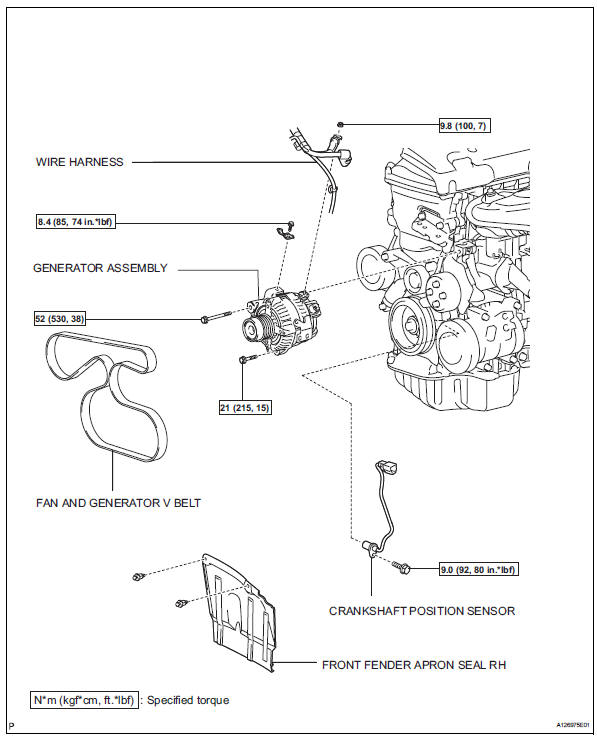
 Installation
Install camshaft position sensor
Notice:
Make sure that the o-ring is not cracked or jammed
when installing it.
Apply a light coat of engine oil to the o-ring of the
sensor.
In ...
 Removal
Disconnect cable from negative battery
terminal
Caution:
Wait at least 90 seconds after disconnecting the
cable from the negative (-) battery terminal to
prevent airbag and seat belt preten ...
Other materials:
Lubrication system
On-vehicle inspection
Check engine oil level
Warm up the engine, stop the engine and wait for 5
minutes.
Check that the engine oil level is between the l and
f marks of the oil dipstick.
If low, check for leakage and add oil up to the f
mark.
Notice:
Do not add engine oil a ...
Door control receiver
Components
Removal
Remove rear door scuff plate rh
Using a screwdriver, detach the 9 claws.
Hint:
Tape the screwdriver tip before use.
Using a clip remover, detach the 2 clips and remove
the garnish.
Remove rear door opening trim
weatherstrip rh
...
Room temperature sensor (for automatic ai conditioning system)
Components
Removal
Remove lower instrument panel
Remove the lower instrument panel (see page ip-
16).
Remove room temperature sensor
Disconnect the duct.
Disconnect the connector.
Detach the claws and remove the sensor.
Inspection
Inspect room temperature ...
