
Toyota RAV4 (XA40) 2013-2018 Service Manual: Diagnosis system
- Description
- Sliding roof system data and diagnostic trouble codes (dtcs) can be read through the vehicle's data link connector 3 (dlc3). When the system seems to be malfunctioning, use the intelligent tester to check for malfunctions and perform repairs.
- Check dlc3
The vehicle uses the iso 15765-4 for communication protocol. The terminal arrangement of the dlc3 complies with iso 15031-03 and matches the iso 15765-4 format.
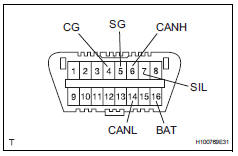
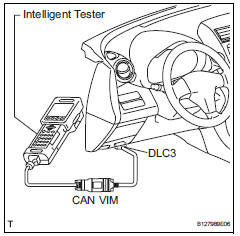
Hint:
Connect the cable of the intelligent tester to the dlc3, turn the ignition switch on and attempt to use the tester.
If the display indicates that a communication error has occurred, there is a problem either with the vehicle or with the tester.
- If communication is normal when the tester is connected to another vehicle, inspect the dlc3 of the original vehicle.
- If communication is still not possible when the tester is connected to another vehicle, the problem may be in the tester itself. Consult the service department listed in the tester's instruction manual.
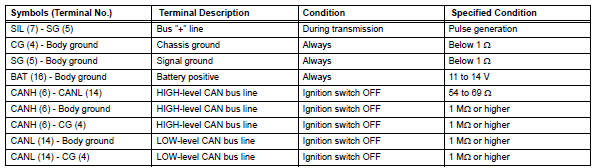
If the result is not as specified, the dlc3 may have a malfunction. Repair or replace the harness and connector.
 Terminals of ecu
Check sliding roof drive gear subassembly (sliding roof ecu)
Disconnect the p6 ecu connector.
Measure the resistance and voltage of the wire
harness side connector.
Reconnec ...
 Dtc check / clear
Check dtc
Connect the intelligent tester to the dlc3.
Turn the ignition switch on and turn the tester on.
Select the following menu item: body / sliding roof /
dtc.
Check the dtc( ...
Other materials:
Exhaust pipe
Installation
Install front exhaust pipe assembly
Using a vernier caliper, measure the free length of
the compression spring.
Minimum length:
41.5 Mm (1.634 In.)
If the length is less than the minimum, replace the
compression spring.
Install a new gasket by hand so that its ...
Problem symptoms table
Hint:
Use the table below to help determine the cause of the
problem symptom. The potential causes of the symptoms
are listed in order of probability in the "suspected area"
column of the table. Check each symptom by checking the
suspected areas in the order they are listed. Re ...
Trailer towing
Your vehicle is designed
primarily as a passenger-and-
load-carrying vehicle.
Towing a trailer can have an
adverse impact on handling,
performance, braking, durability,
and fuel consumption.
For your safety and the
safety of others, you must
not overload your vehicle or
trailer. You must also
ensu ...
