
Toyota RAV4 (XA40) 2013-2018 Service Manual: For vehicles equipped with mobile communication systems
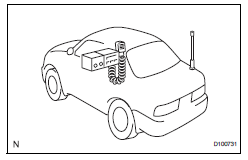
- Install the antenna as far away from the ecu and sensors of the vehicle electronic systems as possible.
- Install an antenna feeder at least 20 cm (7.87 In.) Away from the ecu and sensors of the vehicle electronic systems. For details about ecu and sensor locations, refer to the section of the applicable components.
- Keep the antenna and feeder separate from other wiring as much as possible. This will prevent signals of the communication equipment from affecting vehicle equipment and vice versa.
- Check that the antenna and feeder are correctly adjusted.
- Do not install a high-powered mobile communication system.
 Handling of hose clamps
Before removing the hose, check the clamp position
so that it can be reinstalled in the same position.
Replace any deformed or dented clamps with new
ones.
When reusing a hose, attach t ...
 For vehicles equipped with vehicle stability (vsc) system
Notices when using drum tester
Before beginning testing, disable the vsc. To
disable the vsc, turn the ignition switch off
and connect sst to terminals 12 (ts) and 4
(cg) of the dlc ...
Other materials:
Sleep operation failure of occupant classification ecu
Description
During sleep mode, the occupant classification ecu reads the condition of
each sensor while the ignition
switch is off.
In this mode, if the occupant classification ecu detects an internal
malfunction, dtc b1796 is output.
Inspection procedure
Check for dtc
T ...
Underdrive planetary gear
Components
Disassembly
Remove underdrive planetary gear
preload (see page ax-240)
Remove underdrive input shaft nut
Sst 09930-00010 (09931-00010, 09931-00020),
09387-00050, 09564-16020
Using sst, loosen the staked part of the nut.
Clamp the underdrive planetary gear in ...
Pressure sensor circuit
Description
This dtc is output when the refrigerant pressure is either extremely low
(0.19 Mpa [2.0 Kgf/cm2, 28 psi]
or less) or extremely high (3.14 Mpa [32.0 Kgf/cm2, 455 psi] or more). The air
conditioning pressure
sensor, which is installed on the pipe of the high pressure side, detec ...
