
Toyota RAV4 (XA40) 2013-2018 Service Manual: Front axle hub bolt
Components
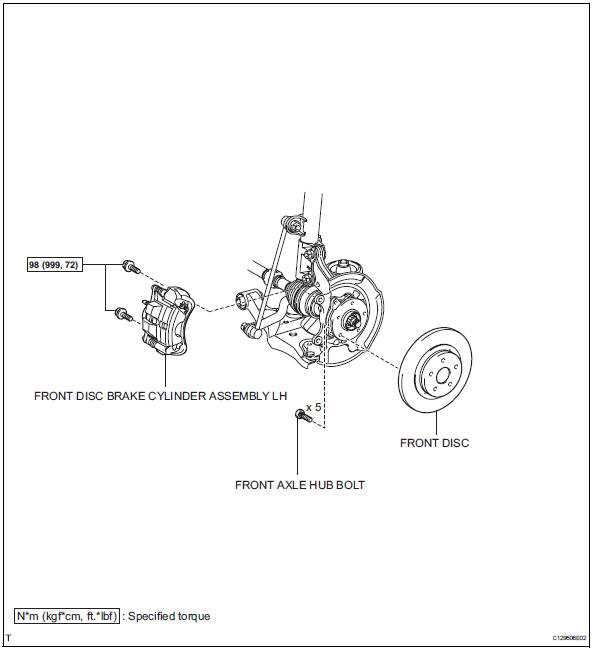
Replacement
Hint
- Use the same procedures for the rh side and lh side.
- The procedures listed below are the lh side.
- Remove front wheel
- Remove front disc brake cylinder assembly lh (see page br-40)
- Remove front disc (see page br-42)
- Remove front axle hub bolt
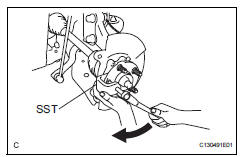
- Using sst, remove the hub bolt that needs to be replaced.
Sst 09650-17011
- Install front axle hub bolt
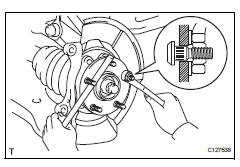
- Insert a new hub bolt into the bolt hole. Set a plate washer and nut on the hub bolt end.
- Using a brass bar or equivalent to hold the front axle, install the hub bolt by tightening the nut. Then remove the nut and plate washer.
- Install front disc (see page br-43)
- Install front disc brake cylinder assembly lh (see page br-46)
- Install front wheel torque: 103 n*m (1,050 kgf*cm, 76 ft.*Lbf)
 Axle system
Problem symptoms table
Hint:
Use the table below to help determine the cause of the
problem symptom. The potential causes of the symptoms are
listed in order of probability in the "suspected ...
 Front axle hub
Components (2005/11-2006/01)
Components (2006/01- )
On-vehicle inspection
Check front axle hub bearing
Remove the front wheel.
Disconnect the front disc brake cylinder (see p ...
Other materials:
Stop light switch circuit
Description
When the stop light switch is turned on, current flows to the stop lights to
illuminate them.
Wiring diagram
Inspection procedure
Inspect fuse (stop)
Remove the stop fuse from the instrument panel
junction block.
Measure the resistance of the fuse.
Standard resi ...
Vehicle speed sensor
Description
Refer to the sfi system (see page es-224).
Wiring diagram
Refer to the sfi system (see page es-224).
Inspection procedure
Refer to the sfi system (see page es-224). ...
Check mode procedure
Panel diagnosis (indicator check)
Turn the ignition switch to lock.
Turn the ignition switch on while simultaneously
pressing the a/c control auto switch and the rec/
frs switch.
Check that all indicators and the display area are
turned on and off 4 times in succession at 1 second ...
