
Toyota RAV4 (XA40) 2013-2018 Service Manual: Axle system
Problem symptoms table
Hint:
Use the table below to help determine the cause of the problem symptom. The potential causes of the symptoms are listed in order of probability in the "suspected area" column of the table. Check each symptom by checking the suspected areas in the order they are listed. Replace parts as necessary.
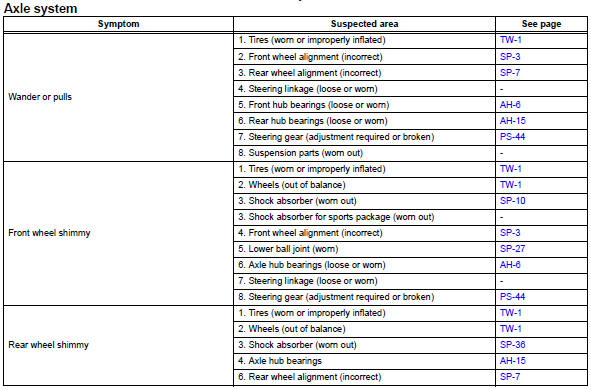
 Axle
Axle
...
 Front axle hub bolt
Components
Replacement
Hint
Use the same procedures for the rh side and lh side.
The procedures listed below are the lh side.
Remove front wheel
Remove front disc brake cylinder
...
Other materials:
Torque converter clutch solenoid performance (shift solenoid valve dsl)
Description
The ecm uses the signals from the throttle position sensor, air-flow meter,
turbine (input) speed sensor,
intermediate (counter) shaft speed sensor and crankshaft position sensor to
monitor the engagement
condition of the lock-up clutch.
Then the ecm compares the engagement ...
Luggage compartment
features
Cargo hooks
Raise the hooks to use.
The cargo hooks are provided for
securing loose items.
Caution
When the cargo hooks are not in use
To avoid injury, always return the cargo hooks to their stowed
positions.
Grocery bag hooks
Notice
Grocery bag hook weight capacity
Do not hang ...
Fuel consumption information
The fuel consumption information can be displayed on entune
premium audio with navigation and entune audio screen.
Display the trip information or past record screen
Vehicles with entune audio
Press the “car� button.
Vehicles with entune premium audio with navigation and entune
au ...
