
Toyota RAV4 (XA40) 2013-2018 Service Manual: Front wiper motor
Inspection
- Inspect front wiper motor
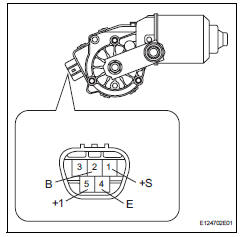
- Check the lo operation.
- Connect the battery's positive (+) lead to terminal 5 (+1) and the negative (-) lead to terminal 4 (e), and check that the front wiper motor operates at low speed (lo).
Ok: front wiper motor operates at low speed (lo).
If the result is not as specified, replace the motor.
- Check the hi operation.
- Connect the battery's positive (+) lead to terminal 3 (+2) and the negative battery (-) lead to terminal 4 (e), and check that the front wiper motor operates at high speed (hi).
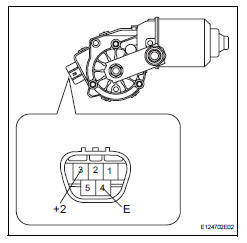
Ok: front wiper motor operates at high speed (hi).
If the result is not as specified, replace the motor.
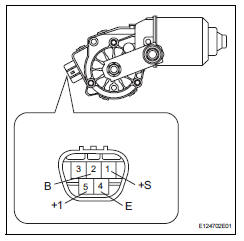
- Check the automatic stop operation.
- Connect the battery's positive (+) lead to terminal 5 (+1) and the negative (-) lead to terminal 4 (e). With the motor rotating at low speed (lo), disconnect the lead from terminal 5 (+1) to stop the wiper motor operation at any position other than the automatic stop position.
- Using sst, connect the terminals 1 (+s) and 5 (+1). Then connect the battery's positive (+) lead to terminal 2 (b) to restart the motor operation at low speed (lo).
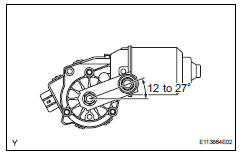
- Check that the motor stops automatically at the automatic stop position.
Ok: refer to the illumination.
If the result is not as specified, replace the motor.
 Problem symptoms table
Hint:
Use the table below to help determine the cause of the
problem symptom. The potential causes of the symptoms are
listed in order of probability in the "suspected area" column of
th ...
 Front wiper motor and link
Components
Removal
Disconnect cable from negative battery
terminal
Caution:
Wait at least 90 seconds after disconnecting the
cable from the negative (-) battery terminal to
prevent ai ...
Other materials:
Multi-information display
Display contents
The multi-information display presents the driver with a variety of driving-
related data including the current outside air temperature.
Outside temperature display
Indicates the outside temperature.
The temperature range that can be
displayed is from -40„af (-40„ac) t ...
Crankshaft position sensor "A"
Description
The crankshaft position (ckp) sensor system consists of a ckp sensor plate
and a pickup coil.
The sensor plate has 34 teeth and is installed on the crankshaft. The pickup
coil is made of wound copper
wire, an iron core and magnet. The sensor plate rotates and, as each tooth ...
Combination meter ecu communication stop mode
Description
Wiring diagram
Inspection procedure
Notice:
Turn the ignition switch off before measuring the resistances of the
main wire and the branch
wire.
After the ignition switch is turned off, check that the key reminder
warning system and light
reminder warning system ...
