
Toyota RAV4 (XA40) 2013-2018 Owners Manual: Function summary
The following operations can be performed simply by carrying the electronic key on your person, for example in your pocket. (The driver should always carry the electronic key.)
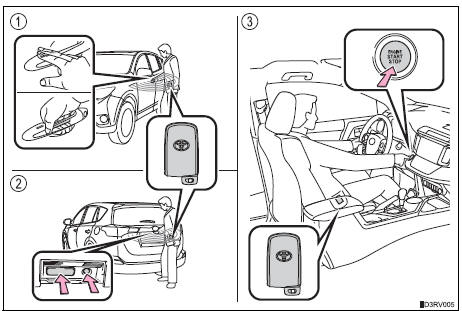
- Locks and unlocks the side doors
- Locks and unlocks the back door
- Starts the engine
Operation signals
A buzzer sounds and the emergency flashers flash to indicate that the doors have been locked/unlocked. (Locked: once; unlocked: twice)
Security feature
If a door is not opened within approximately 60 seconds after the vehicle is unlocked, the security feature automatically locks the vehicle again.
 Smart key system
...
 Unlocking and locking the doors
Front doors
Grip the driver’s door handle to
unlock the door. Grip the passenger’s
door handle to unlock all the
doors.*
Make sure to touch the sensor on
the back of the handle.
The door ...
Other materials:
Installation
Install rear no. 1 Seat assembly lh (w/o rear no. 2 Seat)
Fully tilt the seatback forward.
Place the seat in the cabin.
Notice:
Be careful not to damage the vehicle body.
Connection procedures of seat to lock cable when
reusing seat:
Using a screwdriver, detach the cla ...
Components
...
Removal
Hint:
Use the same procedures for the rh side and lh side.
The procedures listed below are for the lh side.
Remove front pillar cover sub-assembly upper lh
Using a moulding remover, detach the 3 clips and
remove the pillar cover.
...
