
Toyota RAV4 (XA40) 2013-2018 Owners Manual: Unlocking and locking the doors
Front doors
Grip the driver’s door handle to
unlock the door. Grip the passenger’s
door handle to unlock all the
doors.* 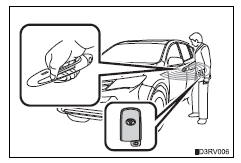
Make sure to touch the sensor on the back of the handle.
The doors cannot be unlocked for 3 seconds after the doors are locked.
*: The door unlock settings can be changed.
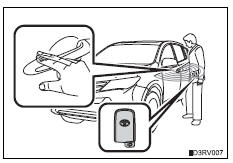
Touch the lock sensor (the indentation
on the upper part of the
door handle) to lock all the doors.
Back door
Press the unlock button to unlock all the doors.
The doors cannot be unlocked for
3 seconds after the doors are
locked.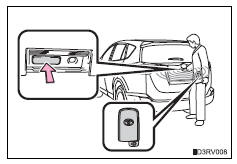
Press the lock button to lock all
the doors.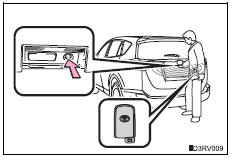
 Function summary
The following operations can be performed simply by carrying the
electronic key on your person, for example in your pocket. (The driver
should always carry the electronic key.)
Locks and unl ...
 Antenna location and effective range
Antenna location
Antennas outside the cabin
Antennas inside the cabin
Antenna outside the luggage
compartment
Effective range (areas within which the electronic key is
detected)
...
Other materials:
Audio system
Operations such as listening to audio, using the hands-free
phone, confirming vehicle information and changing audio system
settings are started by using the following buttons.
Audio system operation buttons
“Audio� button
Display the “select audio source� screen or audio top s ...
Fuel consumption information
The fuel consumption information
can be displayed on
the Multimedia Display.
Display procedure
Press on the main menu,
then press "Trip information" on
the sub menu.
For detail regarding the Multimedia
Display, refer to "MULTIMEDIA
OWNER'S MANUAL".
â– Current fuel consumption
screen
If a screen o ...
Blind Spot Monitor operation
â– Objects that can be detected while driving
The Blind Spot Monitor uses rear side radar sensors to detect the
following vehicles traveling in adjacent lanes and advises the driver
of the presence of such vehicles via the indicators on the outside
rear view mirrors.
Vehicles that are traveling ...
