
Toyota RAV4 (XA40) 2013-2018 Service Manual: Dtc check / clear
- Check dtc
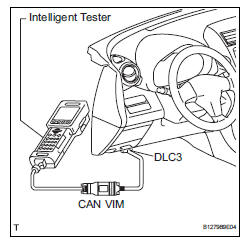
- Connect the intelligent tester (with can vim) to the dlc3.
- Turn the ignition switch on and turn the intelligent tester on.
- Read the dtc by following the prompts on the tester screen.
Hint:
Refer to the intelligent tester operator's manual for further details.
- Clear dtc
- Connect the intelligent tester (with can vim) to the dlc3.
- Turn the ignition switch on and turn the intelligent tester on.
- Clear the dtc by following the prompts on the tester screen.
Hint:
Refer to the intelligent tester operator's manual for further details.
 Diagnosis system
Description
Air conditioning system data and the diagnostic
trouble codes (dtcs) can be read through the
data link connector 3 (dlc3) of the vehicle. When
the system seems to be malfunc ...
 Check mode procedure
Panel diagnosis (indicator check)
Turn the ignition switch to lock.
Turn the ignition switch on while simultaneously
pressing the a/c control auto switch and the rec/
frs switch.
Chec ...
Other materials:
Closing the fuel tank cap
After refueling, turn the fuel tank
cap until you hear a click. Once
the cap is released, it will turn
slightly in the opposite direction.
Caution
When replacing the fuel tank cap
Do not use anything but a genuine toyota fuel tank cap designed for
your
vehicle. Doing so may cause a fire ...
Cd player operation
Insert disc or select “cd� on the audio source selection screen
with a disc inserted to begin listening to a cd.
Audio control screen
Pressing the “audio� button displays the audio control screen from
any screens of the selected source.
Audio source selection screen
appears
Displ ...
Hood
Release the lock from the
inside of the vehicle to open
the hood.
Opening the hood
1. Pull the hood lock release
lever.
The hood will pop up slightly.
2. Push the auxiliary catch lever
to the left and lift the hood.
3. Hold the hood open by inserting
the supporting rod into
the slot.
WARNING
â– ...
