
Toyota RAV4 (XA40) 2013-2018 Service Manual: How to proceed with troubleshooting (2005/11-2006/01)
Hint:
- Use these procedures to troubleshoot the air conditioning system.
- *: Use the intelligent tester.
- Vehicle brought to workshop

- Customer problem analysis and symptom check

- Inspect battery voltage
Standard voltage: 11 to 14 v
If the voltage is below 11 v, recharge or replace the battery before proceeding.

- Check can communication system*
- Use the intelligent tester to check if the can communication system is functioning.
Result 


- Check dtc*
- Check for dtcs and write down any dtcs that are output.
- Clear the dtcs.
- Recheck for dtcs. Based on the dtcs output above, try to cause output of the air conditioning system dtc by simulating the operation indicated by the dtc.
Result 


- Refer to problem symptoms table
Result 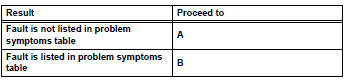


- Overall analysis and troubleshooting*
- Data list / active test (see page ac-127)
- Terminals of ecu (see page ac-122)

- Adjust, repair or replace

- Confirmation test

End
 System description
General
The air conditioning system has the following
features:
The air conditioning amplifier controls the
operation of parts, such as the a/c compressor,
automatically in accord ...
 How to proceed with troubleshooting (2006/01- )
Hint:
Use these procedures to troubleshoot the air conditioning
system
*: Use the intelligent tester.
Vehicle brought to workshop
Customer problem analysis and symptom check
...
Other materials:
Headlight (hi-beam) circuit
Description
The body ecu controls the headlight relay, no. 2 Daytime running light relay
(marking: drl no. 2) And
no. 4 Daytime running light relay (marking: drl no. 4).
Wiring diagram
Inspection procedure
Perform active test by intelligent tester
Connect the intelligent test ...
Shift lock system
Parts location
System diagram
On-vehicle inspection
Check shift lock operation
Move the shift lever to p.
Turn the ignition switch off.
Check that the shift lever cannot be moved to any
position other than p.
Turn the ignition switch on, depress the brake
pedal and chec ...
Compressor solenoid circuit (2006/01- )
Description
In this circuit, the compressor receives a refrigerant compression demand
signal from the air conditioning
amplifier. Based on this signal, the compressor changes the degree of
refrigerant compression.
Hint:
*: Compressor and pulley for 2az-fe, compressor and magnetic clu ...
