
Toyota RAV4 (XA40) 2013-2018 Service Manual: System description
- General
- The air conditioning system has the following features:
- The air conditioning amplifier controls the operation of parts, such as the a/c compressor, automatically in accordance with the operating conditions of the air conditioning system.
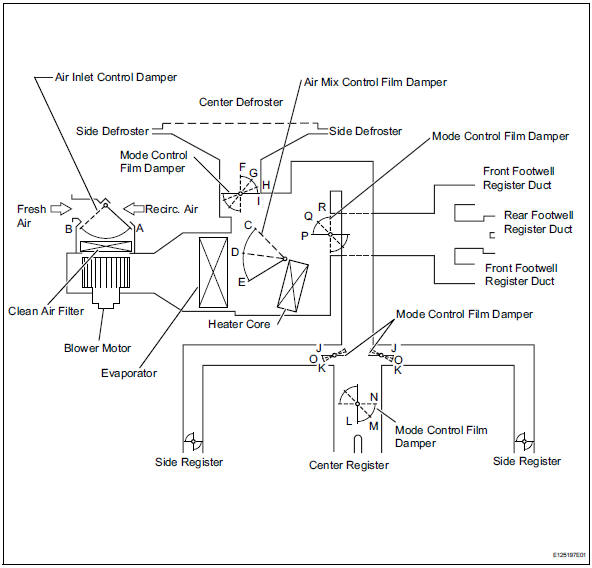
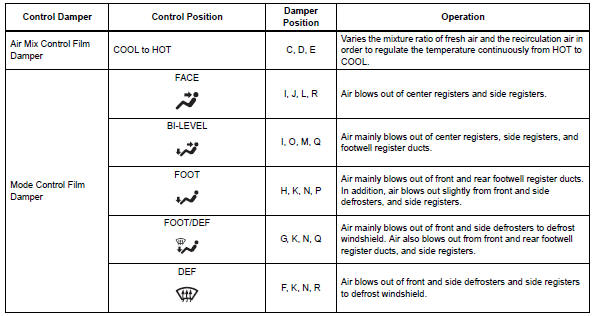
- Mode position and damper operation

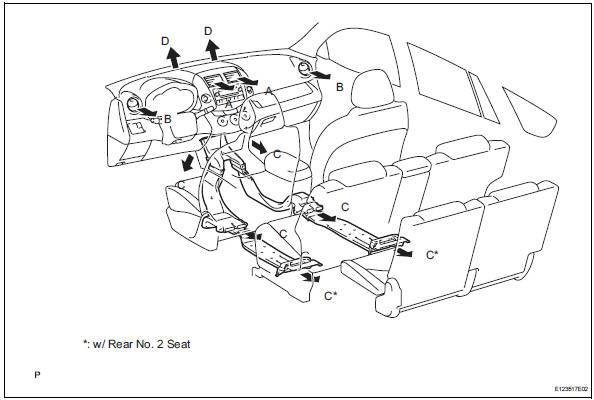
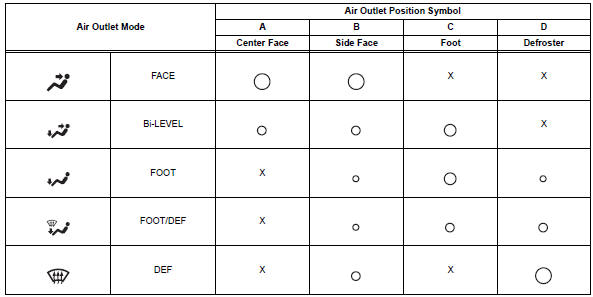
- Air outlet and airflow volume
The circle size (..) Indicates the proportion of the flow volume.
 System diagram
System diagram (2005/11-2006/01)
System diagram (2006/01- )
...
 How to proceed with troubleshooting (2005/11-2006/01)
Hint:
Use these procedures to troubleshoot the air conditioning
system.
*: Use the intelligent tester.
Vehicle brought to workshop
Customer problem analysis and symptom check
...
Other materials:
Stop light switch circuit
Description
When the stop light switch is turned on, current flows to the stop lights to
illuminate them.
Wiring diagram
Inspection procedure
Inspect fuse (stop)
Remove the stop fuse from the instrument panel
junction block.
Measure the resistance of the fuse.
Standard resi ...
Winter driving tips
Carry out the necessary
preparations and inspections
before driving the
vehicle in winter. Always
drive the vehicle in a manner
appropriate to the prevailing
weather conditions.
Pre-winter preparations
Use fluids that are appropriate
to the prevailing outside temperatures.
Engine oil
Engine c ...
Cold start
Description
The electronic throttle control system (etcs) controls the engine idling
speed. The etcs operates the
throttle actuator to open and close the throttle valve, and adjusts the intake
air amount to achieve the
target idling speed.
In addition, the ecm retards the ignition timi ...
