
Toyota RAV4 (XA40) 2013-2018 Service Manual: Installation
Caution:
Be sure to read the precautionary notices concerning the srs airbag system before servicing it (see page rs-1).
- Install steering pad assembly
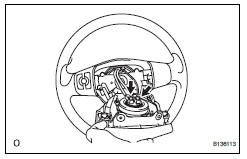
- Support the steering pad with one hand as shown in the illustration.
- Connect the 2 airbag connectors.
Notice:
When handling the airbag connector, do not damage the airbag wire harness.
- Connect the horn connector.
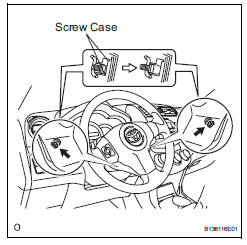
- Install the steering pad after confirming that the circumference grooves of the screws are caught on the screw case.
- Using a t30 "torx" driver, install the 2 screws.
Torque: 8.8 N*m (90 kgf*cm, 78 in.*Lbf)
- Connect cable to negative battery terminal
- Inspect steering pad assembly
- Check for cuts, cracks or discoloration on the steering pad outer surface and in the grooved portion.
- Check that the horn sounds.
- Check srs warning light
- Check the srs warning light (see page rs-34).
 Removal
Caution:
Be sure to read the precautionary notices concerning the
srs airbag system before servicing it (see page rs-1).
Disconnect cable from negative battery
terminal
Caution:
Wait at le ...
 Disposal
Hint:
When scrapping a vehicle equipped with an srs or disposing
of the steering pad, be sure to deploy the airbag first in
accordance with the procedure described below. If any
abnormality occurs ...
Other materials:
Wireless remote
control/electronic
key battery
Replace the battery with a new one if it is depleted.
You will need the following items:
Flathead screwdriver
Small flathead screwdriver
Lithium battery cr2016 (vehicles without a smart key system), or
cr2032 (vehicles with a smart key system)
Replacing the battery
Vehicles without a ...
Installation
Install no. 2 Chain sub-assembly
Set the crankshaft key in the left horizontal position.
Turn the cutout of the drive shaft so that it faces
upward.
Align the yellow mark links with the timing marks of
each gear as shown in the illustration.
Install the sprockets onto ...
Removal
Hint:
Use the same procedures for the lh side and rh side.
The procedures listed below are for the lh side.
Disconnect cable from negative battery
terminal
Caution:
Wait at least 90 seconds after disconnecting the
cable from the negative (-) battery terminal to
prevent airbag and ...
