
Toyota RAV4 (XA40) 2013-2018 Service Manual: Installation
- Install knock sensor
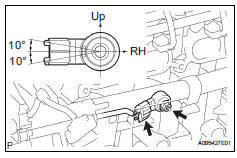
- Install the sensor with the nut.
Torque: 20 n*m (205 kgf*cm, 15 ft.*Lbf)
Notice:
Make sure that the knock sensor is in the correct position.
- Connect the sensor connector.
- Install intake manifold insulator
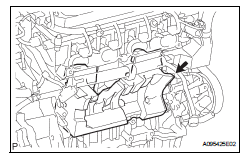
- install the intake manifold insulator onto the cylinder block.
- Install intake manifold
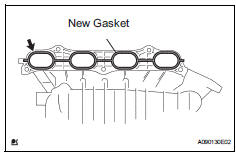
- Install a new gasket into the intake manifold.
- Install the intake manifold with the 5 bolts and 2 nuts.
Torque: 30 n*m (305 kgf*cm, 22 ft.*Lbf)
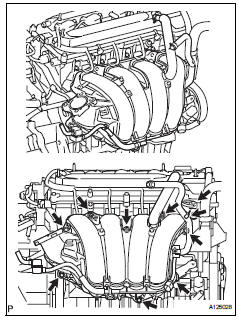
- Fit the union to check valve hose into the vacuum hose clamp.
- Install the wire harness clamp.
- Connect the camshaft timing oil control valve connector.
- Connect the union to check valve hose to the brake booster.
- Connect heater water outlet hose
- Install the heater water outlet hose to the water bypass pipe and heater radiator unit.
- Connect heater water inlet hose
- Install the heater water inlet hose to the cylinder head and heater radiator unit.
- Install the hose clamp.
- Install fuel tube
- Install fuel delivery pipe (see page fu-13)
- Install throttle body (see page es-413)
- Install air cleaner cap (see page es-413)
- Connect cable to negative battery terminal
- Add engine coolant (see page co-6)
- Check for engine coolant leakage (see page co-1)
- Check for fuel leakage (see page fu-14)
- Install no. 1 Engine cover (see page es-414)
 Inspection
Inspect knock sensor
Measure the resistance of the sensor.
Standard resistance
If the result is not as specified, replace the knock
sensor. ...
 Integration relay
On-vehicle inspection
Disconnect cable from negative battery
terminal
Caution:
Wait at least 90 seconds after disconnecting the
cable from the negative (-) battery terminal to
prevent airb ...
Other materials:
Headlight relay
On-vehicle inspection
Remove headlight relay
Remove the headlight relay from the engine room
no. 2 Relay block.
Measure the resistance of the relay.
Standard resistance
If result is not as specified, replace the relay. ...
Front power seat control system
Parts location
System diagram
Problem symptoms table
Hint:
Use the table below to help determine the cause of the
problem symptom. The potential causes of the symptoms are
listed in order of probability in the "suspected area" column
of the table. Check each symptom by check ...
Automatic transaxle fluid
On-vehicle inspection
Check transaxle fluid level
Hint:
Drive the vehicle so that the engine and transaxle are at
normal operating temperature.
Fluid temperature:
70 to 80°c (158 to 176°f)
Park the vehicle on a level surface and set the
parking brake.
With the engine idling and ...
