
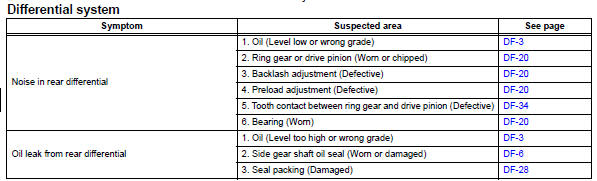
Toyota RAV4 (XA40) 2013-2018 Service Manual: Problem symptoms table
Hint:
Use the table below to help determine the cause of the problem symptom. The potential causes of the symptoms are listed in order of probability in the "suspected area" column of the table. Check each symptom by checking the suspected areas in the order they are listed. Replace parts as necessary.
 Precaution
Before disassembling the differential assembly,
thoroughly clean it by removing any sand, mud or
foreign matter. This will help prevent contamination
during disassembly and reassembly.
When ...
 Differential oil
On-vehicle inspection
Check differential oil
Stop the vehicle on a level surface.
Using a 10 mm socket hexagon wrench, remove the
rear differential filler plug and gasket.
...
Other materials:
Abs warning light remains on
Description
If any of the following conditions are detected, the abs warning light
remains on:
The ecu connectors are disconnected from the skid control ecu.
There is a malfunction in the skid control ecu internal circuit.
There is an open or short in the wire harness between the combinat ...
Driving position memory
Your preferred driving position (the position of the driver’s seat) can
be recorded and recalled by pressing a button.
Two different driving positions can be recorded into memory.
Recording procedure
Check that the shift lever is in p.
Turn the engine switch to the “on� position (ve ...
Bottle holders
Front
Rear
Caution
Items unsuitable for the bottle holder
Do not place anything other than a bottle in the bottle holders.
Other items may be thrown out of the holders in the event of an accident or
sudden braking and cause injury.
Notice
Items that should not be stowed in the bott ...
