
Toyota RAV4 (XA40) 2013-2018 Service Manual: Problem symptoms table (2005/11-2006/01)
Hint:
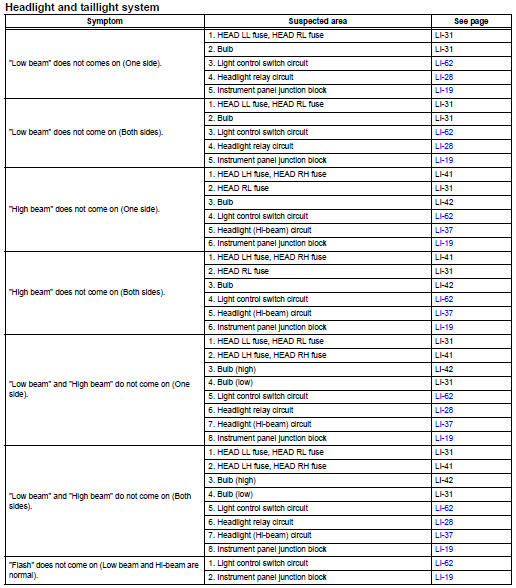
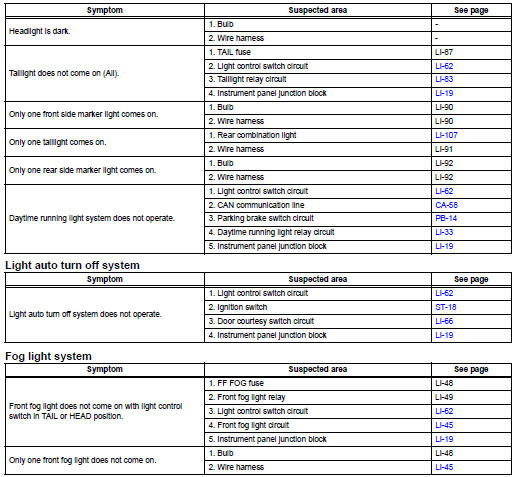
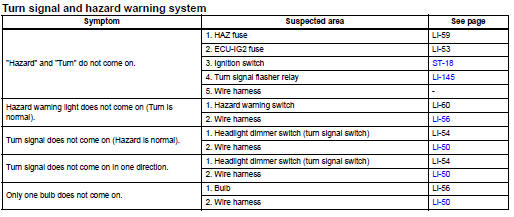
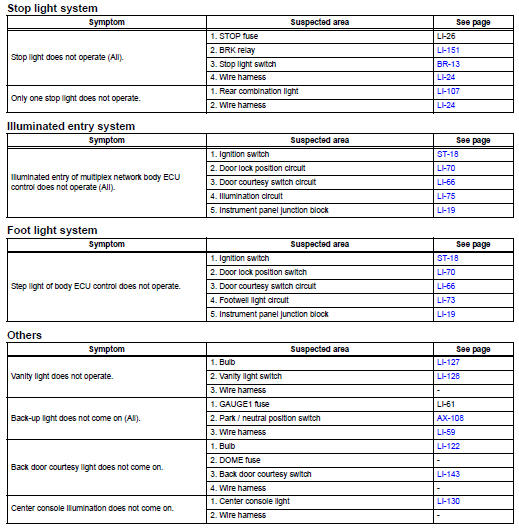
Use the table below to help determine the cause of the problem symptom. The potential causes of the symptoms are listed in order of probability in the "suspected area" column of the table. Check each symptom by checking the suspected areas in the order they are listed. Replace parts as necessary.
 Customize parameters
Hint:
The following items can be customized.
Notice:
When the customer requests a change in a function,
first make sure that the function can be customized.
Be sure to make a note of the cur ...
 Problem symptoms table (2006/01- )
Hint:
Use the table below to help determine the cause of the
problem symptom. The potential causes of the symptoms are
listed in order of probability in the "suspected area" column
of th ...
Other materials:
Rear brake flexible hose
Installation
Hint:
Use the same procedures for the lh side and rh side.
The procedures listed below are for the lh side.
Install rear brake tube flexible hose
Notice:
The gasket and union bolt must be used as a set, as
shown in the illustration.
Connect the flexible hose wi ...
No signal from transmitter id
Description
The tire pressure warning valve and transmitter constantly sends radio waves
to the tire pressure warning
ecu.
Under the following conditions, the tire pressure warning antenna and receiver
is unable to receive the
signals from the tire pressure warning valve and transmitte ...
Front axle hub bolt
Components
Replacement
Hint
Use the same procedures for the rh side and lh side.
The procedures listed below are the lh side.
Remove front wheel
Remove front disc brake cylinder
assembly lh (see page br-40)
Remove front disc (see page br-42)
Remove front axle hub bolt
...
