
Toyota RAV4 (XA40) 2013-2018 Owners Manual: Side doors
Unlocking and locking the doors
The vehicle can be locked and unlocked using the key, entry function, wireless remote control or door lock switch.
Entry function (if equipped)
Wireless remote control
Key
Vehicles without a smart key system
- Locks all the doors
- Unlocks all the doors
Turning the key unlocks the
driver’s door. Turning the key
again within 3 seconds unlocks
the other doors. 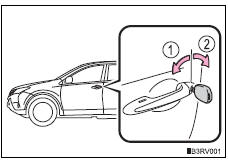
- Vehicles with a smart key system
The doors can also be locked and unlocked with the mechanical key.
Door lock switch
- Locks all the doors
- Unlocks all the doors
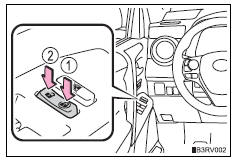
Inside lock buttons
- Locks the door
- Unlocks the door
The front doors can be opened by pulling the inside handle even if the lock buttons are in the lock position.
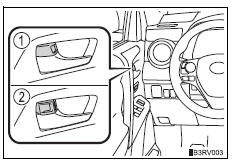
Locking the front doors from the outside without a key
- Move the inside lock button to the lock position.
- Close the door.
Vehicles without a smart key system
The door cannot be locked if the key is in the engine switch.
Vehicles with a smart key system
The door cannot be locked if the engine switch is in accessory or ignition on mode, or the electronic key is left inside the vehicle.
Depending on the position of the electronic key, the key may not be detected correctly and the door may be locked.
Rear door child-protector lock
The door cannot be opened from inside the vehicle when the lock is set.
- Unlock
- Lock
These locks can be set to prevent children from opening the rear doors. Push down on each rear door switch to lock both rear doors.
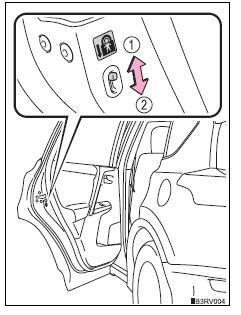
Automatic door locking and unlocking systems
The following functions can be set or canceled: for instructions on customizing, refer to p. 687.
| Function | Operation |
| Speed linked door locking function (vehicles with a smart key system) | All doors are automatically locked when vehicle speed is approximately 12 mph (20 km/h) or higher. |
| Shift position linked door locking function | All doors are automatically locked when shifting the shift lever to position other than p. |
| Shift position linked door unlocking function | All doors are automatically unlocked when shifting the shift lever to p. |
| Driver’s door linked door unlocking function | All doors are automatically unlocked when driver’s door is opened. |
When all the doors are locked with the entry function (vehicles with a smart key system), wireless remote control or key
The doors cannot be unlocked with the door lock switch.
The door lock switch can be reset by unlocking all the doors with the entry function (vehicles with a smart key system), wireless remote control or key.
If a wrong key is used (vehicles with a smart key system)
The key cylinder rotates freely to isolate inside mechanism.
Customization
Settings (e.G. Unlocking function using a key) can be changed.
Caution
To prevent an accident
Observe the following precautions while driving the vehicle.
Failure to do so may result in a door opening and an occupant throwing out of the vehicle, resulting in death or serious injury.
- Ensure that all doors are properly closed and locked.
- Do not pull the inside handle of the doors while driving.
Be especially careful for the front doors, as the doors may be opened even if the inside lock buttons are in locked position.
- Set the rear door child-protector locks when children are seated in the rear seats.
 Wireless remote control
Function summary
The wireless remote control can be used to lock and unlock the vehicle.
It also opens and closes the back door.
Vehicles without a smart key system
Locks all the doors
Unlo ...
 Back door
The back door can be locked/unlocked and opened/closed by
the following procedures.
Locking and unlocking the back door
Door lock switch
Entry function (if equipped)
Wireless remote control
...
Other materials:
Steering wheel audio switches
Some audio features can be controlled using the switches on
the steering wheel.
Operation may differ depending on the type of audio system or
navigation system. For details, refer to the manual provided with
the audio system or navigation system.
Operating the audio system using the steering ...
Back door outside garnish
Components
Removal
Disconnect cable from negative battery
terminal
Caution:
Wait at least 90 seconds after disconnecting the
cable from the negative (-) battery terminal to
prevent airbag and seat belt pretensioner activation.
Remove back door center garnish (see page
ed-5 ...
Monitor drive pattern
Test monitor drive pattern for ect
Caution:
Perform this drive pattern on a level surface and
strictly observe the posted speed limits and traffic
laws while driving.
Hint:
Performing this drive pattern is one method to simulate
the ect's malfunction detection conditions.
The dtcs may ...
