
Toyota RAV4 (XA40) 2013-2018 Owners Manual: All-wheel drive lock switch (awd models)
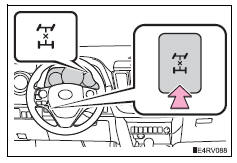
All-wheel drive lock mode can be used when a large amount of drive power needs to be applied to all the wheels, such as when the vehicle gets stuck in mud and you need to free it.
Press the switch.
The torque of the engine is distributed to the rear wheels to the maximum extent possible in accordance with driving conditions.
Pressing the switch again cancels all-wheel drive lock mode and returns the dynamic torque control awd system to normal mode.
All-wheel drive lock mode can be operated when
- Vehicles without a smart key system
The engine switch is in the “on� position.
- Vehicles with a smart key system
The engine switch is in ignition on mode.
All-wheel drive lock mode
- All-wheel drive lock mode is canceled when the brakes are applied to ensure the abs and vsc systems operate effectively.
- All-wheel drive lock mode is canceled when the vehicle speed exceeds 25 mph (40 km/h).
 Rear view monitor
system
Rear view monitor
system
The rear view monitor system assists the driver by displaying an
image of the view behind the vehicle and fixation guide lines
while backing up, for example while parking.
The screen illustrations ...
 Driving assist systems
To help enhance driving safety and performance, the following
systems operate automatically in response to various driving
situations. Be aware, however, that these systems are supplementary
and sh ...
Other materials:
SRS airbags
The SRS airbags inflate when the vehicle is subjected to certain
types of severe impacts that may cause significant injury
to the occupants. They work together with the seat belts to
help reduce the risk of death or serious injury.
SRS airbag system
â– Location of the SRS airbags
SRS front airbags ...
Communication
Description
When a key is inserted into the ignition key cylinder but no communication
occurs between the key and
transponder key ecu, dtc b2796 is output. When a key is inserted into the
ignition key cylinder but a
communication error occurs between the key and transponder key ecu, dtc b ...
Diagnosis system
Description
Key reminder warning system data can be read
through the data link connector 3 (dlc3) of the
vehicle. When the system seems to be
malfunctioning, use the intelligent tester (with can
vim) to check for malfunctions and perform repairs.
Check dlc3
The vehi ...
