
Toyota RAV4 (XA40) 2013-2018 Service Manual: Dtc check / clear
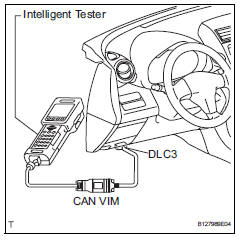
- Check dtc
- Connect the intelligent tester (with can vim) to the dlc3.
- Turn the ignition switch on and turn the intelligent tester on.
- Read the dtc by following the prompts on the tester screen.
Hint:
Refer to the intelligent tester operator's manual for further details.
- Clear dtc
- Connect the intelligent tester (with can vim) to the dlc3.
- Turn the ignition switch on and turn the intelligent tester on.
- Clear the dtc by following the prompts on the tester screen.
Hint:
Refer to the intelligent tester operator's manual for further details.
 Diagnosis system
Description
Air conditioning system data and the diagnostic
trouble codes (dtcs) can be read through the
data link connector 3 (dlc3) of the vehicle. When
the system seems to be malfunc ...
 Data list / active test (2005/11-2006/01)
Read data list
Hint:
Using the intelligent tester's data list allows switch,
sensor, actuator and other item values to be read without
removing any parts. Reading the data list early in
...
Other materials:
Checking the coolant
The coolant level is satisfactory
if it is between the "FULL" and
"LOW" lines on the reservoir
when the engine is cold.
Reservoir cap
"FULL" line
"LOW" line
If the level is on or below the "LOW" line, add coolant up to the "FULL"
line.
â– Coolant selection
Only use "Toyota Super Long Life
Cool ...
Enabling/Disabling the
Parking Support Brake
The Parking Support Brake can
be enabled/disabled on the
screen of the multi-information
display. All of the Parking Support
Brake functions (static
objects and rear-crossing vehicles)
are enabled/disabled
simultaneously.
When the Parking Support Brake is
disabled, the PKSB OFF indicator
illuminat ...
Short to gnd in can bus line
(2005/11-2006/01)
Description
There may be a short circuit between the can bus line and gnd when there is
resistance between
terminals 6 (canh) and 4 (cg) or terminals 14 (canl) and 4 (cg) of the dlc3.
Wiring diagram
Inspection procedure
Notice:
Turn the ignition switch off b ...
