
Toyota RAV4 (XA40) 2013-2018 Service Manual: Ebxotdeyrior rear spoiler
Components
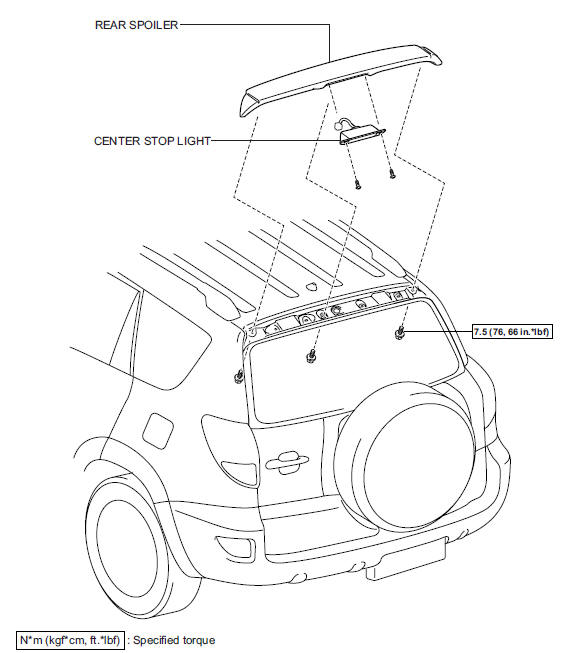
 Installation
Notice:
Do not heat the vehicle body, emblem and name plate
excessively.
Hint:
When installing the emblem and name plate, heat the vehicle
body, emblem and name plate using a heat light.
Standar ...
 Removal
Hint:
When removing the spoiler, heat the vehicle body and spoiler
using a heat light.
Standard heating temperature
Notice:
Do not heat the vehicle body and spoiler excessively.
Disconnect c ...
Other materials:
How to proceed with troubleshooting
Hint:
Use these procedures to troubleshoot the seat belt
warning system.
*: Use the intelligent tester.
Vehicle brought to workshop
Inspect battery voltage
Standard voltage:
11 to 14 v
If the voltage is below 11 v, recharge or replace the battery
before proceeding.
...
Operating instructions
Turning the end of the lever turns on the lights as follows:
Type a
The side marker, parking,
tail, license plate, daytime
running lights and instrument
panel lights turn on.
The headlights and all
lights listed above (except
daytime running lights)
turn on.
The headlights an ...
Front passenger side satellite sensor bus initialization incomplete
Description
When the center airbag sensor receives signals from the lateral deceleration
sensor, it determines
whether or not the srs should be activated.
Dtc b1648/82 is recorded when a malfunction is detected in the rear airbag
sensor rh circuit.
Wiring diagram
Inspection pr ...
